
The FBI USB insider threat advisory issued May 26, 2026 names Silent Ransom Group (SRG) — also tracked as Luna Moth, Chatty Spider, and UNC3753 — as a financially motivated extortion gang that has begun sending physical operatives to corporate offices to insert USB drives into employee workstations when remote-access attacks fail. SRG has compromised at least 76 U.S. law firms since 2023, publicly leaking data from 38 that refused to pay. This article covers the full attack chain, USB device control policy configuration for Windows and macOS, physical access monitoring, and SIEM detection rules for USB insertion events.
// 01 FBI USB Insider Threat: Silent Ransom Group Attack Analysis
Silent Ransom Group has operated since at least 2022, specialising in data-theft extortion rather than encryption-based ransomware. Unlike groups that encrypt files and demand payment for decryption keys, SRG exfiltrates sensitive data and threatens to sell it or publish it on a clearnet leak site — making recovery through backups irrelevant to the extortion threat. This model, sometimes called "hack-and-leak" or "data-only extortion," has proven particularly effective against law firms and financial organisations whose clients require confidentiality as a matter of professional obligation.
By Spring 2026, SRG had targeted more than 76 U.S. law firms, with 38 having their data leaked publicly for refusing to pay. The group does not limit pressure to technical channels: they directly contact employees and clients of victim organisations by phone to amplify extortion, creating reputational and legal liability beyond the breach itself.
The FBI's IC3 advisory (CSA 260526) identifies the core escalation: when remote-access attacks are blocked or detected, SRG sends a physical operative posing as an IT technician to request access to a workstation and insert a USB drive or portable hard drive. This circumvents network-based DLP (Data Loss Prevention — software that monitors and restricts data movement across network boundaries) entirely, since no data traverses the corporate network during exfiltration.
// 02 The USB Attack Kill Chain: How Physical Operatives Work
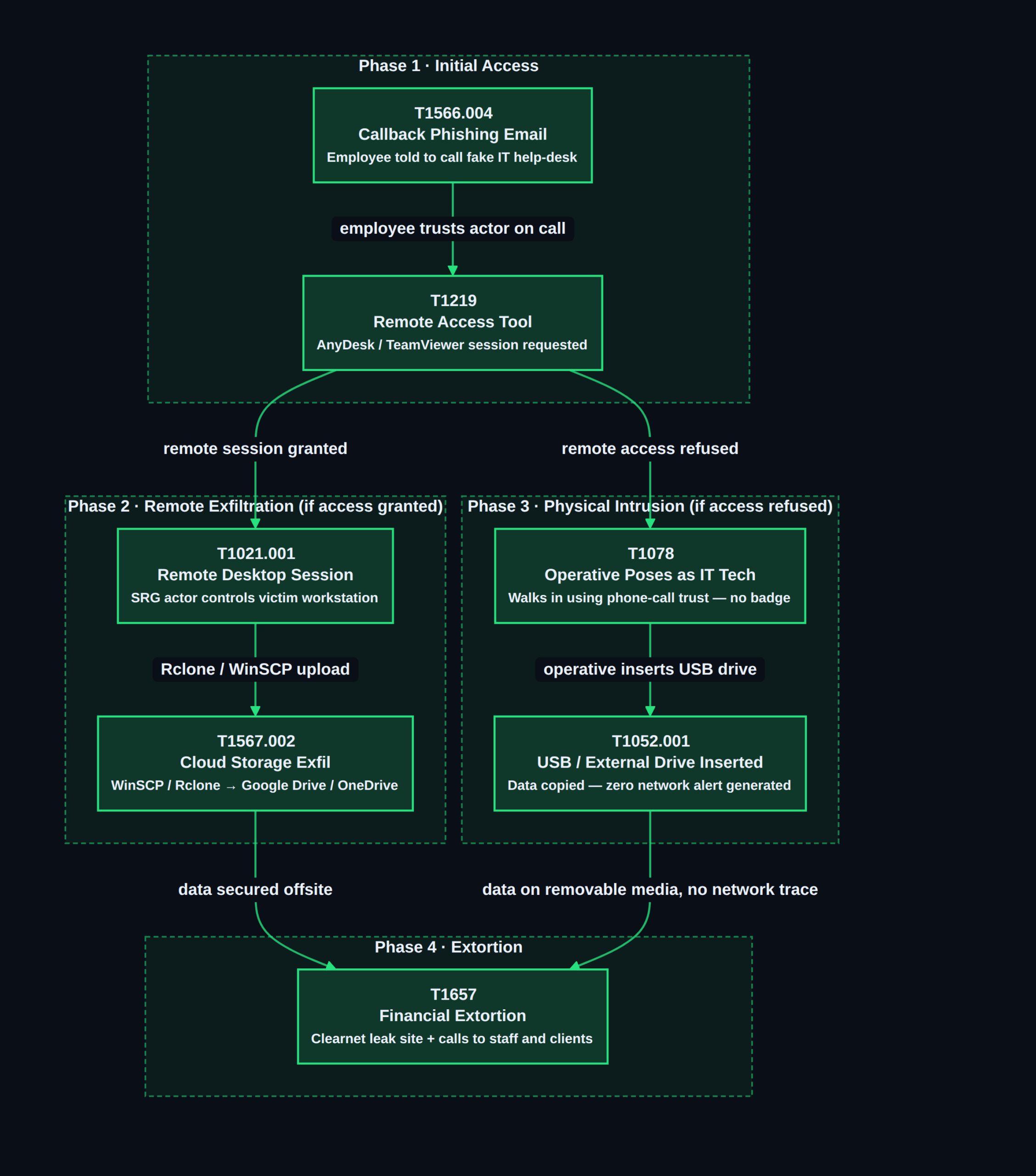
The attack progresses through four escalating stages documented in the FBI advisory and confirmed by SecurityWeek reporting:
Stage 1 — Callback Phishing (MITRE ATT&CK T1566.004) SRG sends emails instructing the target to call a spoofed IT help-desk number. MITRE ATT&CK (a publicly maintained adversary behaviour framework that classifies attack techniques by T-number) catalogues this as T1566.004: Phishing for Information via Callback. The goal is to get the employee on a call with an SRG actor posing as IT support.
Stage 2 — Remote Desktop Session Attempt (T1219, T1021.001) The actor asks the employee to grant a remote desktop session via a legitimate remote-access tool such as AnyDesk or TeamViewer (T1219: Remote Access Software). If access is granted, SRG exfiltrates files using WinSCP (a Windows SCP/SFTP file-transfer client) or Rclone (a command-line cloud-sync tool), uploading data to Google Drive or Microsoft OneDrive under attacker-controlled accounts (T1567.002: Exfiltration to Cloud Storage).
Stage 3 — Physical Intrusion and USB Insertion (T1052.001) When remote access is denied or the employee grows suspicious, SRG dispatches a physical operative to the victim's premises. The operative leverages trust established on the prior phone call — presenting as the same technician who called — to gain brief access to a workstation. They insert a USB drive or portable hard drive and copy data directly to removable media (T1052.001: Exfiltration Over Physical Medium: Removable Media). No network connection is needed; network-based DLP generates no alert.
Stage 4 — Extortion (T1657) Stolen data is used to send ransom demands and to make direct calls to employees and clients of the victim organisation. SRG maintains a clearnet leak site where data from non-paying victims is published, compounding legal and reputational damage.
// 03 Attack Vector: BadUSB and Why Storage Blocks Alone Are Not Enough
SRG's current campaign uses USB drives as mass storage exfiltration devices. A distinct secondary risk exists independently: BadUSB. A BadUSB attack reprogrammes the firmware of a USB device — typically a cheap microcontroller such as an ATtiny85 or a repurposed flash drive — to impersonate a Human Interface Device (HID), specifically a USB keyboard. When plugged in, the device registers as a keyboard and automatically types pre-programmed commands, opening PowerShell, downloading a payload, or executing scripts within seconds of insertion.
BadUSB attacks bypass USB mass storage blocks because the device never presents as removable storage — it announces itself as a keyboard, a device class most policies allow. Mitigating BadUSB requires either USB HID whitelisting (allow only pre-approved keyboards and mice by hardware Vendor ID and Product ID) or disabling all USB ports for unauthorised users via BIOS/UEFI lockdown policy. Given SRG's documented willingness to dispatch operatives carrying custom hardware, treat all USB device classes as in scope for your device control policy.
// 04 Step-by-Step Detection Checklist for USB Insertion Events
Windows Event IDs to Monitor
| Event ID | Log Source | What It Records | |———-|———–|—————-| | 6416 | System | A new external device was recognised by the OS | | 20001 | System (PnP Manager) | Device driver installation started for a new USB device | | 4663 | Security (Object Access) | An attempt to access a removable storage object | | 7045 | System | A new service was installed — relevant for BadUSB HID driver injection |
Enable object access auditing for removable storage via GPO (Group Policy Object — a Windows mechanism for applying configuration settings across Active Directory-managed computers):
Computer Configuration → Windows Settings → Security Settings
  → Advanced Audit Policy Configuration → Object Access
  → Audit Removable Storage → Success and Failure
Splunk Detection Query (SPL)
index=wineventlog (EventCode=6416 OR EventCode=20001)
| eval device_type=coalesce(DeviceType, "Unknown")
| eval user=coalesce(SubjectUserName, "Unknown")
| stats count by host, user, device_type, DeviceId, _time
| where NOT DeviceId IN ("approved_device_id_1","approved_device_id_2")
| sort -_time
Replace the IN list with your organisation's approved hardware IDs. A missing DeviceId field indicates the device did not complete standard enumeration — potentially a BadUSB controller.
Microsoft Sentinel (KQL — Kusto Query Language)
SecurityEvent
| where EventID == 6416
| extend DeviceId = tostring(extract(@"DeviceId: ([^rn]+)", 1, EventData))
| extend UserName = tostring(extract(@"SubjectUserName: ([^rn]+)", 1, EventData))
| where DeviceId !in~ ("approved_device_id_1", "approved_device_id_2")
| project TimeGenerated, Computer, UserName, DeviceId, EventID
| order by TimeGenerated desc
For Microsoft Defender for Endpoint (MDE) environments, query the DeviceEvents table in Advanced Hunting for higher-fidelity device metadata:
DeviceEvents
| where ActionType == "UsbDriveMount"
| where DeviceName !in~ ("approved_device_id_1")
| project Timestamp, DeviceName, InitiatingProcessAccountName, AdditionalFields
| order by Timestamp desc
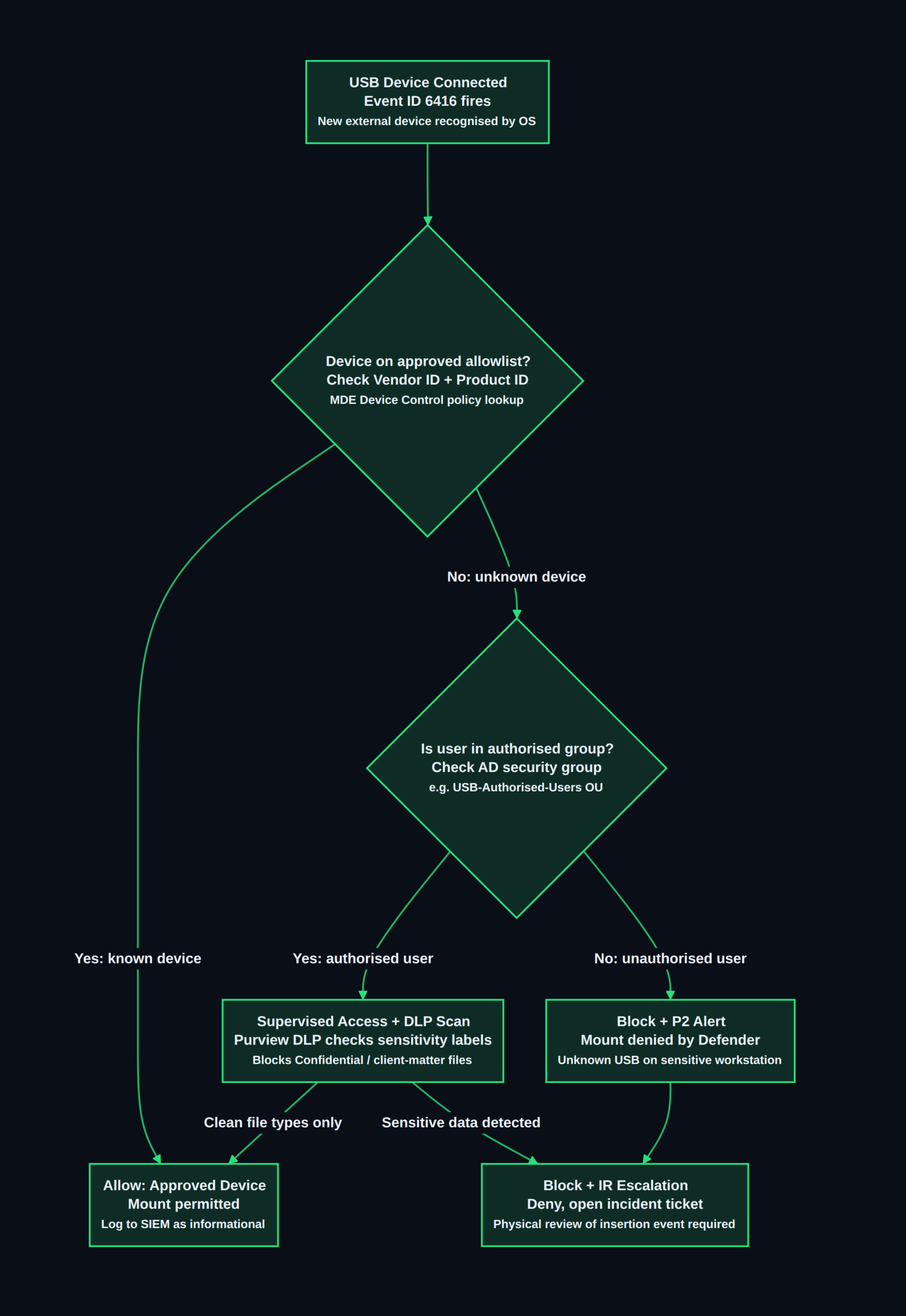
USB Policy Decision Flow
// 05 USB Device Control Policy: Windows and macOS DLP Configuration
Windows: Group Policy (GPO)
Open gpmc.msc (Group Policy Management Console), create a new GPO linked to the target OU (Organisational Unit — a container in Active Directory for grouping computers or users under a shared policy), and navigate to:
Computer Configuration → Policies → Administrative Templates
  → System → Removable Storage Access
  → All Removable Storage Classes: Deny all access → Enabled
This blocks read and write access to USB drives, external hard drives, and SD cards for all machines in the linked OU. To add exceptions for specific approved encrypted drives, use Microsoft Defender for Endpoint Device Control (below) rather than raw GPO exceptions, which lack audit granularity.
To disable the USB storage driver entirely via PowerShell — useful for non-domain endpoints or scripted deployment:
# Disable USB Mass Storage driver (Start value 4 = disabled, takes effect after reboot)
Set-ItemProperty -Path "HKLM:SYSTEMCurrentControlSetServicesUSBSTOR" `
  -Name "Start" -Value 4 -Type DWord

# Verify the change took effect
Get-ItemProperty "HKLM:SYSTEMCurrentControlSetServicesUSBSTOR" | Select-Object Start
A Start value of 4 disables the driver on next reboot. To re-enable, set Start back to 3.
Windows: Microsoft Defender for Endpoint Device Control
For organisations with Microsoft Defender for Endpoint deployed, Device Control policies offer hardware-ID-level granularity — block all unknown removable storage while allowing specific encrypted drives (e.g., IronKey or BitLocker-To-Go-enabled drives) by Vendor ID and Product ID. Policies deploy via Intune or GPO. Each block or audit event is reported in the Defender portal under Reports → Endpoints → Device control, recording device type, hardware ID, user, hostname, timestamp, and action taken.
macOS: MDM Configuration Profile
macOS has no GPO equivalent for USB blocking. Controls are applied via MDM (Mobile Device Management — a protocol for remotely managing device configuration and restrictions) profiles delivered through Jamf Pro, Microsoft Intune, or Mosyle. In Jamf, create a Configuration Profile with a Restrictions payload, navigate to the Media section, and enable Restrict Removable Storage.
To audit connected USB devices on macOS from the command line:
# List all currently connected USB devices
system_profiler SPUSBDataType

# Stream USB connection events in real time (requires root)
log stream --predicate 'subsystem == "com.apple.iokit"'
  --level debug | grep -i "usb"
Forward macOS Unified Log to your SIEM via the Elastic agent or Fluentd for centralised correlation with Windows endpoint events.
Cross-Platform: Microsoft Purview Endpoint DLP
For Microsoft 365 environments, Microsoft Purview Endpoint DLP extends sensitivity-label-based controls to USB egress: policies can permit USB access while blocking the copying of documents labelled Confidential or Highly Confidential to removable storage. This is the right balance when some users legitimately need USB access for encrypted backups or authorised data transfers, but client-matter files must never leave on removable media.
// 06 Physical Access Controls and Insider Threat Program Design
An operative walking through the front door exploits physical security gaps as much as digital ones. The following controls address the human and physical dimensions of the FBI USB insider threat that endpoint DLP alone cannot cover.
Visitor Verification Protocol All visitors claiming to be IT support — announced or unannounced — must be verified via a callback to the IT department's known internal number, not any number the visitor provides. Require photo ID and an open ticket number in your ITSM (IT Service Management — the system used to log, track, and approve IT tasks, e.g., ServiceNow or Jira) for any claimed service activity. SRG's technique works because the employee on the phone already trusts the "technician" before they arrive physically; a single verification step breaks the chain.
Badge Access Correlation Physical access control systems (PACS) record every badge swipe. Build a SIEM correlation rule: a PACS event for an unfamiliar badge OR a tailgate event, followed by Windows Event ID 6416 within 10 minutes on a workstation in that physical zone, constitutes a high-confidence physical exfiltration indicator. Pull PACS records as part of every USB-alert investigation.
Insider Threat Programme Design The NCSC Insider Threat Mitigation Framework recommends six programme pillars:
- Executive sponsorship and written policy mandate
- Cross-functional insider threat hub (HR, Legal, Security Operations, IT)
- UEBA (User and Entity Behaviour Analytics — automated baseline analysis of user activity to flag anomalous patterns) to detect abnormal file-access volumes before exfiltration begins
- Annual employee awareness training covering social engineering scripts and physical security procedures
- Defined triage and escalation runbook for insider threat indicators
- Legal review of all monitoring scope to comply with applicable privacy laws and, for law firms, ABA Model Rules on client confidentiality
For law firms specifically, a USB-based data exfiltration event may trigger mandatory breach notification obligations to clients. Factor this into your IR (Incident Response) plan alongside the technical investigation.
Remote Access Tool Lockdown Block AnyDesk, TeamViewer, and similar unapproved remote-access tools via application control policy on workstations that handle client files. On Windows, use AppLocker or WDAC (Windows Defender Application Control — a policy framework that restricts which applications are permitted to run):
# Block AnyDesk via AppLocker publisher rule (deploy via GPO)
# Computer Configuration → Windows Settings → Security Settings
# → Application Control Policies → AppLocker → Executable Rules
# Add a Deny rule for Publisher: O=PHILANDRO SOFTWARE GMBH (AnyDesk publisher)

# Verify AppLocker policy is enforced
Get-AppLockerPolicy -Effective | Test-AppLockerPolicy -Path "C:Program Files (x86)AnyDeskAnyDesk.exe"
For related guidance on how SRG-adjacent threat actors exploit cloud-based SSO remote access paths once initial access is established, see our breakdown of Cordial Spider's vishing and SSO extortion campaign — the social engineering playbook overlaps substantially.
// 07 FBI Hardening Checklist
The following consolidates the FBI advisory recommendations with enterprise endpoint hardening controls:
- Verify all IT support requests against ITSM tickets. Legitimate technicians have an open ticket number. No ticket → no workstation access, no exceptions.
- Block USB mass storage by default. Deploy GPO or MDE Device Control to deny all removable storage globally. Maintain an allowlist of approved encrypted drives by Vendor ID and Product ID.
- Alert on every unknown USB device insertion. Configure SIEM alerting on Event ID 6416 with an approved-device allowlist. Any unknown device on a sensitive workstation is a P2 security incident.
- Deploy phishing-resistant MFA. FIDO2 hardware security keys (WebAuthn-based physical tokens that require physical possession to authenticate) or certificate-based authentication prevent SRG from hijacking remote sessions even after a successful callback phishing call.
- Block outbound transfers via unapproved cloud sync tools. Use a CASB (Cloud Access Security Broker — a policy enforcement point between users and cloud services) or firewall rules to block Rclone command-line connections. Flag large unauthorised uploads to Google Drive and OneDrive from non-approved accounts.
- Review physical visitor and escort procedures. Require escort for all non-badged visitors. Test whether reception and IT staff would hand over workstation access to an unverified walk-in "technician" — run a tabletop exercise.
- Deploy UEBA for anomalous data access detection. Alert when a user account accesses significantly more files than their 30-day baseline — a pre-insertion indicator of staged data before USB exfiltration.
- Restrict and audit remote access tool installation. Block AnyDesk and TeamViewer on client-data workstations via AppLocker or WDAC. Log all successful remote desktop sessions with session duration and files accessed.
- Correlate badge access logs with USB insertion events. Build a correlation rule: PACS anomaly AND Event ID 6416 within 10 minutes on the same workstation zone triggers a physical security alert requiring immediate investigation.
- Update your IR runbook for physical exfiltration scenarios. USB-based data theft leaves fewer network logs than remote exfiltration. Ensure endpoint USB event collection and PACS record retrieval are both included in evidence-gathering procedures.
See also our guide to detecting adversary-in-the-middle phishing targeting Microsoft 365 for detection patterns that apply to SRG's Stage 2 remote-access exfiltration path — the network-side counterpart to the physical USB vector covered here.
// 08 Conclusion
The FBI USB insider threat advisory from May 2026 signals a meaningful escalation in how financially motivated extortion groups operate: Silent Ransom Group is no longer purely a remote threat. Law firms are the current primary target, but the tactic — phishing to establish trust, then dispatching a physical operative when digital access is blocked — is transferable to any organisation with valuable confidential data and weak physical access controls. The defensive response requires two coordinated layers working together: block USB mass storage by default with GPO or Defender Device Control and alert immediately on any unrecognised device insertion; and verify that your physical visitor procedures would stop an unverified "technician" before they reach a workstation. Neither control is technically complex — but both are frequently absent in professional-services environments where IT helpfulness creates openings that SRG actively exploits.
See our coverage of Scattered Spider's arrest and social engineering playbook for broader context on how extortion groups have evolved their physical social engineering methods. Subscribe to our weekly threat digest for FBI advisory coverage as it breaks →
For any query contact us at contact@cipherssecurity.com