
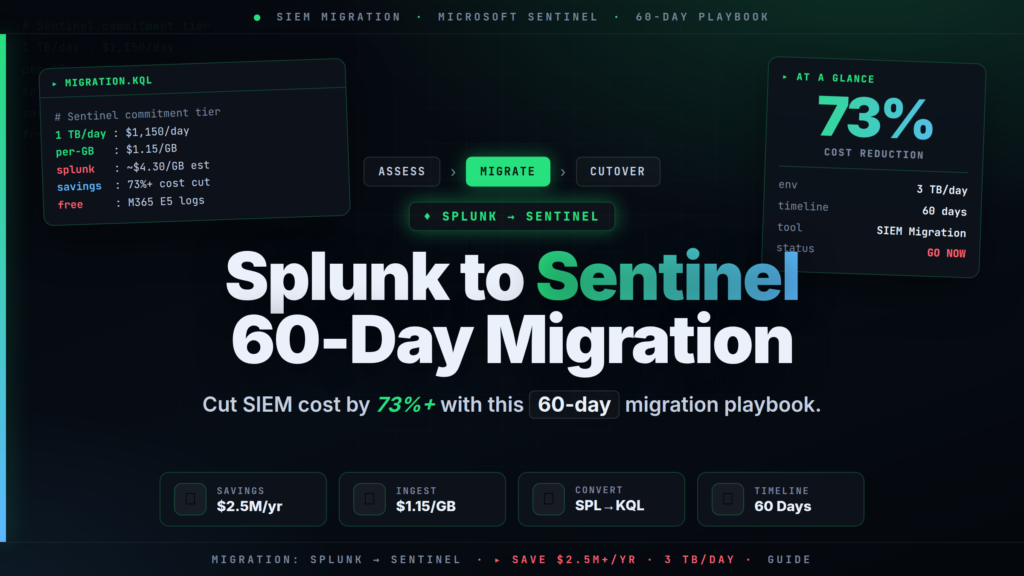
The Splunk to Microsoft Sentinel migration is the dominant SIEM project of 2026, driven by Splunk renewal quotes that routinely exceed comparable Sentinel commitment-tier pricing by 40–75%. In a 3 TB/day ingest environment, that gap exceeds $2.5 million annually — before accounting for free Microsoft 365 data ingestion available to E5-licensed organisations. This 60-day playbook covers every phase: data source inventory, connector mapping, SPL (Search Processing Language — Splunk's native query language) to KQL (Kusto Query Language — Sentinel's query language) detection rule conversion, retention tier selection, parallel-run validation, and clean cutover.
// 01 Splunk to Microsoft Sentinel Migration: Why 2026 Is the Tipping Point
Splunk's consumption-based licensing model prices on daily ingest volume. For mid-to-large organisations on Splunk Cloud, the effective per-GB annual cost — factoring in platform fees, infrastructure, premium support, and search head capacity — typically lands at $4–6 per GB ingested per day, annualised. At 3 TB/day, that produces an annual spend of $4.4M–$6.6M before professional services.
Microsoft Sentinel prices against a Log Analytics workspace on a consumption or commitment model. The 1 TB/day commitment tier costs $1,150 per day ($1.15/GB), with no per-user or per-seat licensing fees on top. At the 5 TB/day tier the rate drops to $1.10/GB. Organisations on Microsoft 365 E5 licences ingest a substantial set of critical log sources at zero per-GB cost: Microsoft Entra ID (formerly Azure Active Directory) sign-in and audit logs, Office 365 management activity, Microsoft Defender for Endpoint telemetry, and Microsoft Defender XDR incidents all fall outside the billable data plane for E5 customers.
One near-term deadline affects any migration touching custom data pipelines: Microsoft is deprecating the legacy HTTP Data Collector API on September 14, 2026. Any Splunk forwarding integration using that API must be rerouted to the Logs Ingestion API or a supported AMA (Azure Monitor Agent — the recommended agent for all new Sentinel deployments) connector before that date.
// 02 Real Cost Savings at 3 TB/Day: The Numbers
Using published Sentinel commitment-tier pricing and independently benchmarked Splunk Cloud cost data, the Splunk to Microsoft Sentinel migration at 3 TB/day produces this savings profile:
| Metric | Splunk Cloud (3 TB/day) | Microsoft Sentinel (3 TB/day) |
|---|---|---|
| Base per-GB rate (all-in annualised) | ~$4.30/GB | $1.15/GB (1 TB/day commitment) |
| Annual ingest cost | ~$4.7M | ~$1.26M |
| M365 E5 free data (30% of volume = 900 GB/day) | Not available | ~$378K deducted |
| Effective annual cost | ~$4.7M | ~$882K |
| Annual saving | — | ~$3.82M (81%) |
Even accounting for one-time migration costs — tooling, analyst retraining on KQL, and 60-day parallel-run compute overhead — most organisations at 3 TB/day recover migration costs within 90 days of cutover.
The free-data benefit is not marginal. Microsoft Entra sign-in logs alone account for 5–15% of daily ingest volume in typical enterprise environments. Add Defender for Endpoint process and network events, and E5 organisations routinely reach 25–35% free coverage on day one of connectivity before any workspace tuning.
// 03 Phase 1 (Days 1–14): Inventory and Workspace Design
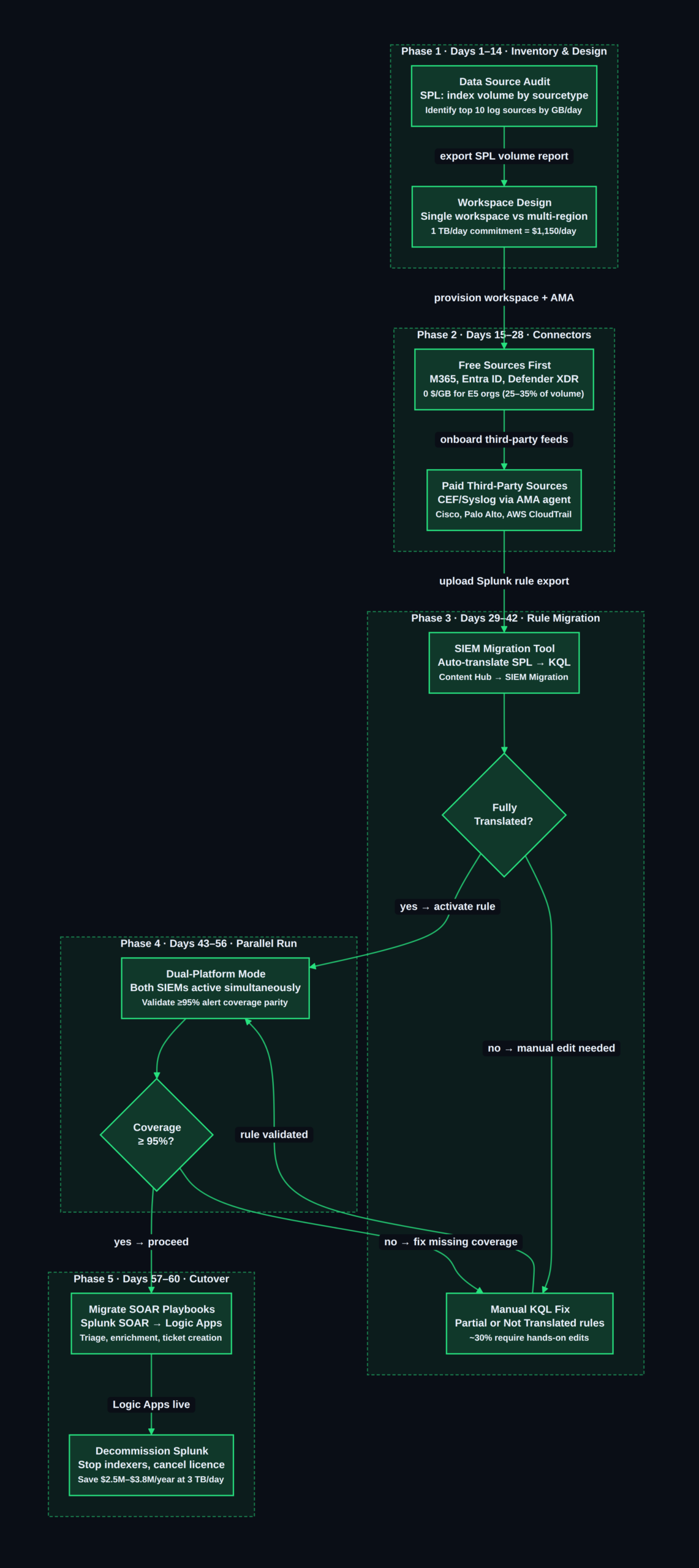
The first two weeks are entirely non-destructive — no production changes, no connector deployments. The deliverable is a complete audit of what Splunk is ingesting, at what volume, and with what mandatory retention.
Step 1 — Export your Splunk index inventory. Run this SPL query against your deployment manager to get volume-by-sourcetype over the past seven days:
| tstats count WHERE index=* BY index, sourcetype, host span=7d
| stats sum(count) AS event_count BY index, sourcetype
| addcoltotals
| sort -event_count
Step 2 — Export all active detection rules. In the Splunk UI, navigate to Settings → Searches, Reports, and Alerts and export all enabled alerts to CSV. Capture: rule name, SPL query, alert threshold, cron schedule, severity, and owning team.
Step 3 — Map retention requirements. Work with legal and compliance to assign each log type a minimum retention period. This directly determines which Sentinel log tier applies (detailed in the Retention section below). PCI-DSS requires one year; HIPAA requires six years; OMB M-26-14 requires 30 months for federal environments — see our federal cybersecurity logging requirements guide for the full breakdown.
Step 4 — Design your Sentinel workspace topology. For most organisations a single Sentinel workspace per environment (production and staging) is optimal. Multi-workspace topologies add query complexity and cross-workspace join overhead. Use multiple workspaces only when data residency requirements mandate separate Azure regions, or when regulatory frameworks require physical log isolation between business units.
Step 5 — Select your commitment tier. If your Phase 1 volume audit shows 2.5–3.5 TB/day, start at the 1 TB/day commitment tier and commit additional 1 TB blocks as you onboard log sources. Sentinel automatically falls back to pay-as-you-go ($2.46/GB) for any overage — cost predictability without hard caps.
// 04 Phase 2 (Days 15–28): Data Connector Configuration
Microsoft Sentinel provides over 300 data connectors via the Content Hub. The migration playbook connects them in a strict priority order: free Microsoft sources first, then paid first-party Azure services, then third-party CEF (Common Event Format — a vendor-neutral log encoding standard) and Syslog sources.
Splunk sourcetype to Sentinel table mapping:
| Splunk Sourcetype / Index | Sentinel Table | Connector | Ingest Cost |
|---|---|---|---|
wineventlog:security | SecurityEvent | Windows Security Events via AMA | Billed |
XmlWinEventLog:Microsoft-Windows-Sysmon/Operational | DeviceProcessEvents | Defender for Endpoint | Free (E5) |
o365:management:activity | OfficeActivity | Microsoft 365 | Free (E5) |
azure:aad:signin | SigninLogs | Microsoft Entra ID | Free (E5) |
cisco:asa | CommonSecurityLog | Common Event Format via AMA | Billed |
pan:traffic | CommonSecurityLog / PaloAltoNetworkFirewall | Palo Alto NGFW solution | Billed |
aws:cloudtrail | AWSCloudTrail | AWS S3 connector | Billed |
linux:syslog | Syslog | Syslog via AMA | Billed |
ms:defender:atp:alerts | SecurityAlert | Defender for Endpoint | Free (E5) |
The AMA agent replaces the legacy Log Analytics Agent (MMA) for all new Sentinel deployments. Deploy AMA on each source host via an Azure Policy assignment to your Connected Machines resource group — this ensures coverage extends automatically to any new host provisioned in the environment.
For on-premises syslog and CEF sources — firewalls, VPN concentrators, network appliances — deploy a dedicated Linux syslog forwarder VM with AMA installed. Route appliance syslog traffic (UDP/TCP 514) to the forwarder; AMA parses and forwards events to your Log Analytics workspace. Size the forwarder at a minimum of 4 vCPUs and 8 GB RAM for volumes above 1 TB/day.
// 05 SPL to KQL Conversion: Real Examples
SPL and KQL share a pipe-delimited, sequential architecture but differ in function names, table schemas, and aggregation syntax. Microsoft's built-in SIEM Migration tool — found in Sentinel under Content management → Content hub → SIEM Migration — auto-translates uploaded SPL rules to KQL using AI-powered intent mapping via Security Copilot. In practice, approximately 70% of rules receive a "Fully Translated" status; the remaining 30% are "Partially Translated" and require manual edits.
The following examples demonstrate common detection patterns converted manually. Use them to understand what the automated tool produces and to validate or fix partial translations.
Example 1 — Brute-force detection (failed authentication, EventID 4625)
index=windows EventCode=4625
| stats count AS failures BY src, user
| where failures > 10
| sort -failures
SecurityEvent
| where EventID == 4625
| summarize failures = count() by IpAddress, Account
| where failures > 10
| order by failures desc
Key differences: Splunk's index= selector becomes a table name (SecurityEvent); stats count BY becomes summarize count() by; Splunk's sort -field becomes KQL's order by field desc.
Example 2 — Suspicious child process spawned by an Office application (T1566.001 — Spearphishing Attachment)
index=sysmon EventCode=1 ParentImage="*\winword.exe"
| stats count BY CommandLine, ComputerName
| where count > 1
DeviceProcessEvents
| where InitiatingProcessFileName =~ "winword.exe"
| summarize count() by ProcessCommandLine, DeviceName
| where count_ > 1
Splunk's ParentImage field maps to Sentinel's InitiatingProcessFileName under the Defender for Endpoint (MSDE) schema. The =~ operator in KQL performs case-insensitive string equality — the equivalent of Splunk's like without wildcards. MITRE ATT&CK T1566.001 is the spearphishing-attachment technique in the industry-standard adversary behaviour framework.
Example 3 — Outbound connection volume anomaly (C2 beacon candidate)
index=network dest_category!=internal
| stats dc(dest_ip) AS unique_ips BY src_ip
| where unique_ips > 100
VMConnection
| where Direction == "Outbound"
| where DestinationIp !startswith "10."
    and DestinationIp !startswith "192.168."
    and DestinationIp !startswith "172.16."
| summarize unique_ips = dcount(DestinationIp) by SourceIp
| where unique_ips > 100
KQL's dcount() is the direct equivalent of SPL's dc() (distinct count). Private RFC-1918 address exclusion replaces Splunk's lookup-based dest_category field — the KQL approach is more portable and does not require a maintained lookup file.
For the complete SPL-to-KQL function mapping — including eval, rex, mvexpand, lookup, and transaction equivalents — refer to the Azure Sentinel SPL-to-KQL reference.
// 06 Phase 3 (Days 29–42): Detection Rule Migration with the SIEM Migration Tool
Upload the CSV or JSON export from Phase 1 Step 2 to the SIEM Migration tool (Microsoft Sentinel → Content management → Content hub → SIEM Migration). The tool returns one of three translation statuses for each rule:
- Fully Translated — KQL query generated and data source matched to an existing Sentinel connector. Review the translation, verify the threshold and scheduling, activate the rule, and mark it migrated.
- Partially Translated — Query partially converted; contains
// TODOplaceholders for lookup tables, macros, or Splunk-specific functions. Apply manual fixes using the patterns above. - Not Translated — Rule uses Splunk-specific data models, accelerated searches, or transaction commands with no direct KQL equivalent. These require full manual rewrites.
The SIEM Migration tool also supports Splunk CIM (Common Information Model) to ASIM (Advanced Security Information Model — Sentinel's schema normalisation layer) translation, which is critical for sourcetype-agnostic detection rules.
Prioritisation order for rule migration:
- Critical-severity rules mapping to MITRE ATT&CK T1078 (Valid Accounts — credential-based initial access), T1059 (Command and Scripting Interpreter), and T1190 (Exploit Public-Facing Application) — highest operational risk if not covered during parallel run.
- Any rule with confirmed alert activity in the past 30 days — active rules carry the most risk of coverage gap.
- Compliance-mandated detections — PCI-DSS, HIPAA, SOC 2, or internal audit requirements with named detection controls.
- Informational and low-fidelity rules — migrate in Phase 4 parallel run; validate against synthetic test events.
// 07 Retention and Archiving: Matching Log Tiers to Your Data
Sentinel's tiered log architecture is the most significant cost lever beyond commitment-tier selection. Routing high-volume, low-query-frequency data to cheaper tiers can reduce total log storage costs by 30–50% compared with keeping everything in the default Analytics tier.
| Tier | Ingest Cost | Interactive Retention | Full KQL | Best For |
|---|---|---|---|---|
| Analytics Logs | $2.46/GB PAYG or commitment rate | Up to 2 years | Yes | Security events, incidents, alerts |
| Basic Logs | ~$0.60/GB | 30 days | Single-table | Endpoint telemetry, app logs (moderate query frequency) |
| Auxiliary Logs | $0.15/GB | 30 days | Job-based only | Netflow, proxy, DNS — high volume, rare queries |
| Archive | $0.02/GB/month | N/A (restore required) | No | Compliance archives, 1–7 years |
Practical tier allocation for a 3 TB/day environment:
- Security events, Entra ID sign-ins, Defender alerts (~300 GB/day): Analytics tier — full KQL needed for real-time detection.
- Endpoint process and network telemetry (~800 GB/day): Basic Logs — lower query frequency, 30-day interactive window sufficient for most investigations.
- Firewall, proxy, and netflow logs (~1.6 TB/day): Auxiliary Logs tier at $0.15/GB — saves approximately $582K/year compared with Analytics-tier ingest for this volume alone ($0.15 vs $1.15/GB × 1,600 GB × 365 days).
- Compliance archive (all tiers → cold storage after interactive period): Archive tier at $0.02/GB/month for 1–7 year retention.
The Auxiliary Logs tier is particularly important for firewall and proxy logs migrating from Splunk — these are typically the highest-volume, lowest-alert-fidelity data sources in any enterprise SIEM. Keeping them in Analytics-tier storage is the single most common cause of Sentinel cost overruns post-migration.
// 08 Phase 4 (Days 43–56): Parallel Run and Alert Coverage Validation
Run both SIEMs simultaneously for two weeks. Keep Splunk receiving and indexing data normally; simultaneously, all connectors feed Sentinel. The objective is to confirm that Sentinel's migrated detection ruleset generates alerts on the same event classes Splunk would catch.
Use this KQL query to measure daily alert volume against your historical Splunk baseline:
SecurityAlert
| where TimeGenerated > ago(14d)
| summarize alert_count = count() by bin(TimeGenerated, 1d), AlertName
| order by TimeGenerated desc, alert_count desc
Define coverage parity as ≥95% of rule categories producing at least one alert across the 14-day window for data sources where you have confirmed activity. Any rule category at zero alerts during the parallel run requires investigation — common causes: the connector is not flowing the expected table, the field name mapping is wrong, or the KQL logic does not match the original SPL intent.
For low-frequency detection rules (weekly or monthly trigger rates), validate coverage by replaying representative Splunk-exported events through the Azure Monitor Logs Ingestion API and confirming Sentinel triggers as expected.
Verify connector data is flowing for each critical table:
union SecurityEvent, SigninLogs, OfficeActivity, DeviceProcessEvents, CommonSecurityLog
| where TimeGenerated > ago(1d)
| summarize last_event = max(TimeGenerated), event_count = count() by Type
| order by last_event desc
Any table with last_event more than two hours old indicates a broken connector — fix before proceeding to cutover.
// 09 Phase 5 (Days 57–60): Cutover, SOAR Migration, and Decommission
SOAR playbook migration — Splunk SOAR to Logic Apps: Splunk SOAR (formerly Phantom — Security Orchestration, Automation, and Response) organises response workflows as Python-based playbooks. Microsoft Sentinel's equivalent is Logic Apps — visual workflow automation with 400+ native connectors. Re-implement your highest-value playbooks in this priority order:
- Auto-triage: close low-fidelity alerts (e.g., scan noise from known internal IPs) without analyst intervention.
- IP/domain enrichment: query VirusTotal, Threat Intelligence, and WHOIS on alert observables; write results back to the incident.
- Ticket creation: open ServiceNow, Jira, or PagerDuty incidents from Sentinel alerts with pre-populated triage fields.
Splunk SOAR playbooks with complex Python logic require full redesign as Logic Apps workflows. Simple field-manipulation playbooks — parsing an alert field, sending a Teams notification, updating an incident field — typically take under 30 minutes to re-implement using Logic Apps' built-in Sentinel actions.
Pre-cutover verification checklist:
[ ] All Sentinel connector feeds validated (≥95% coverage parity confirmed)
[ ] Tier-1 and Tier-2 detection rules active and tested in Sentinel
[ ] SOAR automation rules live and tested for top-10 alert types
[ ] Retention policies applied (Analytics / Basic / Auxiliary / Archive)
[ ] HTTP Data Collector API deprecated and removed before Sept 14, 2026
[ ] Sentinel RBAC (Role-Based Access Control) roles mirror Splunk access tiers
[ ] Splunk search head set to read-only (preserve 60-day historical search access)
[ ] Splunk indexers stopped and licence contract cancellation submitted
After the Splunk licence is cancelled, maintain read-only access to the Splunk search head for 30–60 days to service any historical investigation requests before the index is decommissioned.
If your organisation is evaluating whether to run Sentinel in-house or partner with an MDR (Managed Detection and Response) provider to operate the new platform, see our best MDR services guide for mid-market enterprises for a current comparison of providers with native Sentinel expertise. For SOC 2 Type II compliance obligations driving the migration timeline, our SOC 2 Type II 90-day guide maps the specific log retention and monitoring controls to Sentinel log tier configurations.
// 10 Conclusion
The Splunk to Microsoft Sentinel migration is a controllable 60-day programme, not a multi-year transformation. For a 3 TB/day environment, the combination of Sentinel commitment-tier pricing ($1.15/GB), free Microsoft 365 data ingestion for E5-licensed organisations, and Auxiliary Logs tier routing for high-volume firewall and proxy data produces an effective annual cost under $900K — compared with $4.7M+ on equivalent Splunk Cloud. The SIEM Migration tool handles the bulk of SPL-to-KQL rule conversion; the connector mapping is systematic; and the tiered retention model maps directly to Splunk's index-level tiering concepts SOC engineers already understand. The highest-risk step is skipping the parallel-run phase — run both platforms simultaneously for 14 days and confirm ≥95% alert coverage parity before decommissioning anything.
Start with Phase 1 this week: export your Splunk index volume report, identify your top 10 log sources by GB/day, and map each to its Sentinel connector and log tier equivalent. That single inventory exercise will give you the inputs for every subsequent phase decision.
For any query contact us at contact@cipherssecurity.com