
Compliance and IT leads who need to automate compliance evidence collection in 2026 face a binary choice: maintain manually assembled screenshot bundles that collapse under auditor scrutiny, or deploy a CCM (Continuous Control Monitoring — automated, real-time checking of whether security controls are active and passing) platform such as Drata or Vanta that gathers, timestamps, and organises evidence from every in-scope system, every hour, without human intervention. This guide covers the concrete integration steps for AWS, GitHub, Microsoft 365, and HRIS systems, a head-to-head comparison of integration depth between the two dominant platforms, and the auditor read-only portal workflow that eliminates last-minute evidence scrambles at the end of each audit period.
// 01 Why Manual Evidence Collection Fails at Scale
Manual compliance evidence collection — a screenshot of an S3 bucket policy today, an exported CSV of Active Directory users tomorrow — is operationally unsustainable at any meaningful audit scope. A mid-size SaaS company pursuing SOC 2 Type II (an annual audit from an AICPA-certified auditor that certifies security controls operated effectively over a twelve-month observation period) typically needs to produce evidence for 80 to 120 controls, each requiring periodic proof that the control was active throughout the year, not just the morning the auditor arrived.
The structural problem with point-in-time screenshots is that they do not prove continuous operation. A control that passed in month eleven but failed in months one through ten is still an audit finding. Auditors from firms such as A-LIGN, Prescient Assurance, and KirkpatrickPrice routinely flag organisations that arrive at fieldwork with snapshots rather than time-series evidence records.
CCM platforms replace this workflow entirely. Each platform connects to your cloud accounts, identity providers, code repositories, MDM (Mobile Device Management — the system that manages and enforces security policies on employee laptops and phones) tools, and HRIS (Human Resources Information System — the software that holds employee records including hire dates, termination dates, and job titles) via API integrations. Every hour (Vanta's stated cadence) or on a near-continuous basis (Drata's model), the platform polls each connected system, checks whether controls are passing, and stores a timestamped evidence record. By the time an auditor requests evidence for a specific control and date range, there are hundreds of data points demonstrating continuous compliance — not a single screenshot.
// 02 Automate Compliance Evidence Collection 2026: Platform Overview
Before implementation, the table below summarises where Drata and Vanta stand as of mid-2026:
| Dimension | Drata | Vanta |
|---|---|---|
| Total integrations | 170+ | 400+ |
| Compliance frameworks | 26+ | 35+ |
| Evidence check cadence | Continuous (24/7) | Hourly |
| Entry price (annual) | ~$7,500/year | ~$10,000/year |
| Per-additional-framework cost | ~$1,500 | ~$5,000 |
| G2 rating | 4.8★ (1,100+ reviews) | 4.6★ (2,300+ reviews) |
| Custom control framework | Yes (Custom Tests) | Standard |
| AWS service depth | Standard cross-account | 40+ services including EKS |
| AI features | Custom Tests builder | AI Agent 2.0 (policy generation, gap analysis) |
Both platforms support SOC 2, ISO 27001, HIPAA, GDPR, and PCI DSS (Payment Card Industry Data Security Standard — the compliance framework required for organisations that handle cardholder data). Both provide read-only auditor portals accepted by any AICPA-certified audit firm. The differences matter most at scale: Drata's per-framework add-on pricing (~$1,500) is significantly lower than Vanta's (~$5,000), making it the better choice for multi-framework deployments. Vanta's broader integration catalogue suits organisations with large, heterogeneous SaaS stacks.
// 03 Step 1: Connect AWS via Cross-Account IAM Role
AWS is typically the most critical integration for any cloud-native organisation's compliance programme. Both Drata and Vanta use a cross-account IAM (Identity and Access Management — the AWS service that controls who can access what resources) role to read your AWS environment without write access.
Setup procedure
- Create a dedicated IAM role in your AWS account. During onboarding, each platform provides its own AWS account ID and an external ID. The cross-account trust policy should reference both:
{
  "Version": "2012-10-17",
  "Statement": [
    {
      "Effect": "Allow",
      "Principal": {
        "AWS": "arn:aws:iam::<PLATFORM_ACCOUNT_ID>:root"
      },
      "Action": "sts:AssumeRole",
      "Condition": {
        "StringEquals": {
          "sts:ExternalId": "<PLATFORM_PROVIDED_EXTERNAL_ID>"
        }
      }
    }
  ]
}
- Attach the AWS-managed
SecurityAuditpolicy plus targeted read permissions for services not covered by it. A minimal supplemental policy:
{
  "Version": "2012-10-17",
  "Statement": [
    {
      "Effect": "Allow",
      "Action": [
        "cloudtrail:GetTrailStatus",
        "s3:GetBucketPublicAccessBlock",
        "s3:GetBucketPolicy",
        "guardduty:GetDetector",
        "guardduty:ListDetectors",
        "kms:DescribeKey",
        "kms:ListKeys",
        "rds:DescribeDBInstances",
        "ec2:DescribeSecurityGroups",
        "config:DescribeConfigurationRecorderStatus"
      ],
      "Resource": "*"
    }
  ]
}
- Provide the role ARN (Amazon Resource Name — the unique identifier for an AWS resource, formatted as
arn:aws:iam::<account-id>:role/<role-name>) to the platform's integration setup page.
Once connected, the platform reads and monitors:
- EC2 (Elastic Compute Cloud — AWS's virtual machine service) instance configurations and security group rules
- S3 (Simple Storage Service — AWS's object storage) bucket policies, ACLs, and public access block status
- IAM users, roles, policies, and access key age (flagging keys older than 90 days)
- CloudTrail (the AWS service that logs all API calls for audit purposes) enablement and log integrity validation
- GuardDuty (AWS's managed threat detection service) activation status per region
- RDS (Relational Database Service) instance encryption at rest
- KMS (Key Management Service) key rotation schedules
- VPC (Virtual Private Cloud) flow log enablement
For multi-account AWS Organizations deployments, both platforms support a delegated administrator model — a single trust relationship from the management account cascades read access to all member accounts.
Verify the integration is working by running this check after connecting:
# Confirm the platform can assume the role successfully
aws sts assume-role
  --role-arn "arn:aws:iam::<YOUR_ACCOUNT>:role/<PLATFORM_ROLE_NAME>"
  --role-session-name "compliance-test"
  --external-id "<PLATFORM_EXTERNAL_ID>"
# Expected: JSON response with Credentials block — no error means trust policy is correct
// 04 Step 2: Connect GitHub, Microsoft 365, and HRIS
GitHub integration
Both platforms install as a GitHub App on your GitHub organisation. No repository write access is requested. Evidence collected includes:
- Branch protection rule status on default branches: required reviewers, required passing status checks, and admin enforcement
- Repository visibility (flagging any public repositories owned by the organisation)
- Code scanning (SAST — Static Application Security Testing, which automatically reviews code for vulnerabilities) tool enablement
- Dependency review and secret scanning settings
- Organisation member roles and pending invitations (used for user access reviews)
# Verify branch protection is correctly configured post-integration
# Manual check via GitHub CLI for the main branch:
gh api /repos/{owner}/{repo}/branches/main/protection
  --jq '{
    required_reviews: .required_pull_request_reviews.required_approving_review_count,
    dismiss_stale_reviews: .required_pull_request_reviews.dismiss_stale_reviews,
    enforce_admins: .enforce_admins.enabled,
    required_status_checks: .required_status_checks.contexts
  }'
A common gap surfaced by both platforms: repositories with direct-push access enabled for repository administrators, which bypasses the required-reviewer rule and creates a control failure.
Microsoft 365 / Azure AD integration
Both platforms register an Azure AD (Active Directory — Microsoft's cloud identity and access management service) application with read-only Microsoft Graph API permissions. A Global Administrator must grant admin consent during setup. Evidence collected includes:
- Per-user MFA (Multi-Factor Authentication — requiring a second verification step beyond password) enrollment status
- Admin role assignments (Global Admin, Security Admin, Exchange Admin)
- Conditional Access policies (rules that enforce MFA, device compliance, or location requirements before granting access to Microsoft 365 services)
- Device compliance via Microsoft Intune if deployed
- Email security configuration: DKIM (DomainKeys Identified Mail — a digital signature standard that verifies email was sent from your domain) and DMARC (Domain-based Message Authentication, Reporting, and Conformance — a policy that instructs receiving servers how to handle unauthenticated email) records
HRIS integration
HRIS integrations (BambooHR, Rippling, Workday, Gusto, ADP) are essential for personnel-related controls: background check completion, security training acknowledgment, and offboarding verification. Both platforms sync on a 24-hour cycle using read-only API credentials.
Drata's published data scope for HRIS integrations includes: first/last name, work email, employment status, hire date, termination date, job title, manager, and team. Explicitly excluded from collection: SSNs, dates of birth, home address, marital status, compensation, and phone numbers.
ADP note: ADP's API architecture requires the "Practitioner Role" — an elevated permission level within ADP — even though the actual data scope retrieved is identical to other HRIS integrations. This is an ADP API design constraint, not a platform request for elevated system access.
When an employee termination event is detected in the HRIS, both platforms automatically trigger a user access review alert to verify that the departing employee's accounts have been deprovisioned across all connected systems — closing the most common offboarding evidence gap.
// 05 Step 3: Policy Management and Employee Acknowledgments
Raw configuration evidence covers the technical controls, but compliance frameworks also require documented policies and proof that employees have read and acknowledged them. Both platforms include a policy management library:
- Drata: ships with 30+ pre-built policy templates (Acceptable Use, Access Control, Incident Response, Business Continuity, Vendor Management, etc.) that can be customised and assigned to employees for annual acknowledgment
- Vanta: includes similar policy templates plus AI Agent 2.0, which can generate first-draft policies from a description of your environment and automatically flag outdated policy versions
Employee acknowledgment records (who signed, timestamp, policy version) are automatically attached to the relevant compliance controls as evidence — replacing the manual process of exporting DocuSign CSVs and uploading them before each audit.
// 06 End-to-End Evidence Collection Flow
The diagram below shows a complete automate compliance evidence collection 2026 deployment — how data flows from source systems through the CCM platform to the auditor portal:
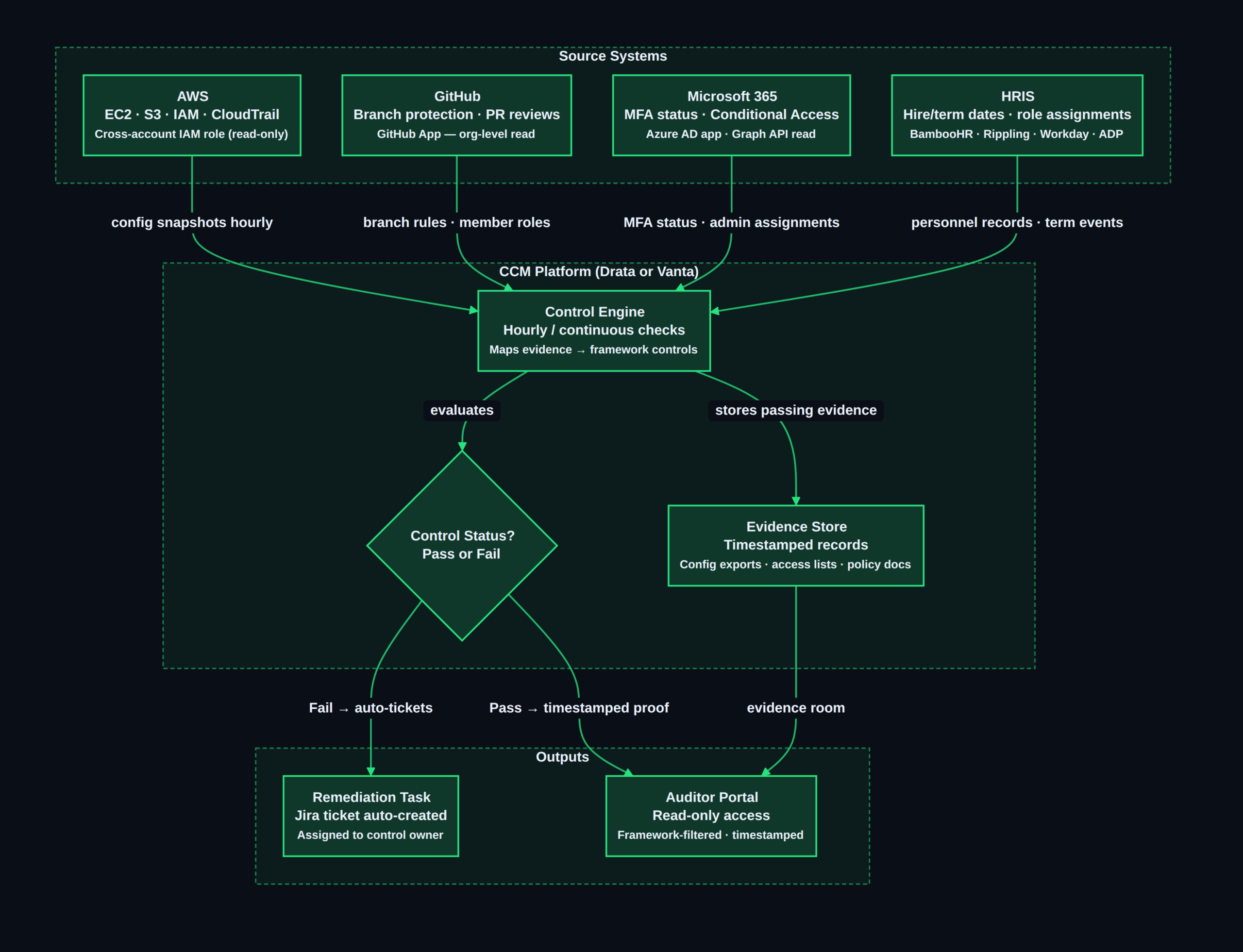
Each source system feeds the Control Engine via its dedicated API integration. Passing controls flow immediately into the Evidence Store as timestamped records. Failing controls trigger a Jira ticket assigned to the control owner. Auditors access only the read-only portal — they never log into AWS, GitHub, or M365 directly.
// 07 Step 4: Remediation Tracking with Jira Integration
Both platforms integrate bidirectionally with Jira (Atlassian's project tracking tool) for remediation workflows:
- A control fails — for example, an S3 bucket has public access enabled or a user's MFA is not enrolled
- The platform automatically creates a Jira issue with the control description, the specific failing resource, and the deadline for remediation
- The issue is assigned to the designated control owner
- When the owner resolves the issue and closes the Jira ticket, the CCM platform re-runs the check
- If the check now passes, a new timestamped evidence record is created showing the control is back in compliance
This produces a complete audit trail for findings: the control failed on a specific date, a remediation ticket was created and assigned, the fix was applied, and the control passed again — all with timestamps the auditor can inspect directly.
# Confirm an S3 remediation is complete before re-checking the control
aws s3api get-public-access-block --bucket <bucket-name>
# Expected output after remediation:
# {
#   "PublicAccessBlockConfiguration": {
#     "BlockPublicAcls": true,
#     "IgnorePublicAcls": true,
#     "BlockPublicPolicy": true,
#     "RestrictPublicBuckets": true
#   }
# }
// 08 Step 5: Grant Auditor Access to the Read-Only Portal
The auditor handoff workflow is where both platforms eliminate the traditional ZIP-of-screenshots approach. Both provide a dedicated auditor portal — a restricted login that gives external auditors direct access to evidence without exposing any administrative or configuration functions.
Granting access
- Navigate to Settings → Users → Invite Auditor (exact navigation varies by platform version)
- Enter the auditor's email address. The system creates a read-only account automatically — no full user seat is consumed and no additional cost is triggered
- The auditor receives a secure invitation link and creates credentials for the portal
- Optionally, scope the auditor's view to a specific framework and audit period (e.g., SOC 2 Type II, 1 Jan – 31 Dec 2025)
What auditors can see and do
In the auditor portal, reviewers can:
- Filter evidence by control domain: Access Control, Change Management, Availability, Confidentiality, Risk Management, Vendor Management
- View each control's complete evidence history: every automated check result with its timestamp, every manually uploaded document, and every policy acknowledgment record
- Inspect the status timeline for any control over the full observation period — confirming that the control operated continuously, not just at a single point in time
- Download individual evidence files if their workpaper process requires it
- Add internal review notes and mark controls as reviewed
Neither Drata nor Vanta locks you into a specific audit firm — both platforms are accepted by any AICPA-certified auditor including the major compliance firms. Auditors do not need to learn a new evidence format; the portal organises evidence against the same trust service criteria (for SOC 2) or Annex A controls (for ISO 27001) they work with on every engagement.
// 09 Integration Depth: Drata vs Vanta Head-to-Head
| Integration category | Drata | Vanta |
|---|---|---|
| Cloud providers | AWS, GCP, Azure | AWS (40+ services), GCP, Azure |
| Identity/SSO | Okta, Google Workspace, M365 | Okta, Google Workspace, M365 |
| HRIS | BambooHR, Workday, Gusto, Rippling, ADP, UKG Ready | BambooHR, Gusto, Rippling, Workday |
| MDM/Endpoint | Jamf, Kandji, Intune | Standard MDM support |
| Code/DevOps | GitHub, GitLab | GitHub |
| Security tools | CrowdStrike, Datadog | CrowdStrike, Datadog |
| Custom/internal tools | Yes — Custom Tests framework | Manual upload only |
Drata advantages:
- Custom Tests framework: write code-based checks for internal tools, proprietary infrastructure, or non-standard systems that have no native integration
- Stronger Apple device fleet support via Jamf and Kandji integration depth
- Per-framework pricing saves $10,000+ annually for organisations pursuing three or more frameworks simultaneously
Vanta advantages:
- 400+ integrations cover more of the SaaS-heavy enterprise stack
- Vanta monitors 40+ AWS services including Amazon EKS (Elastic Kubernetes Service — the managed Kubernetes container orchestration service) against the CIS (Center for Internet Security) EKS Benchmark
- AI Agent 2.0 generates policy first drafts and runs automated gap analysis against selected frameworks, reducing the initial setup effort by an estimated 40–60% for organisations starting their first compliance programme
// 10 Evidence Freshness Scoring and Pre-Audit Readiness
Both platforms surface a readiness score or compliance percentage in their dashboards — a rolling count of passing controls versus total controls in scope for the selected framework. Best practice is to review this score weekly starting at least ninety days before the audit observation period ends.
For SOC 2 Type II, failing to detect a control failure until the week before audit fieldwork is operationally damaging: the auditor will see the failure in the historical evidence record regardless. Remediation that happens the day before fieldwork does not retroactively fix the missing evidence from the months before. Continuous monitoring from day one of the observation period is the only way to build a clean twelve-month record.
Vanta's hourly check cadence means a newly introduced misconfiguration appears as a control failure within sixty minutes. Drata's continuous model catches drift similarly fast. Compare this to a quarterly manual spot-check: a misconfiguration introduced in month one of a quarter might not be caught until month three — three months of audit exposure.
// 11 Choosing Between Drata and Vanta
| Scenario | Recommended platform |
|---|---|
| Single framework (SOC 2 only) | Either — evaluate on integration fit |
| Multi-framework (SOC 2 + ISO 27001 + HIPAA) | Drata — ~$10,000+ cheaper per year |
| Large SaaS stack (50+ integrated tools) | Vanta — broader integration catalogue |
| Heavy AWS/EKS container environment | Vanta — 40+ AWS services, EKS benchmark support |
| Custom/proprietary infrastructure | Drata — Custom Tests framework |
| First compliance programme, limited internal resources | Vanta — AI Agent 2.0 reduces setup effort |
| Apple-heavy endpoint fleet | Drata — deeper Jamf and Kandji integration |
If budget is the primary constraint: Drata's ~$1,500 per-framework add-on versus Vanta's ~$5,000 means a three-framework deployment (SOC 2 + ISO 27001 + HIPAA) costs roughly $10,500 on Drata versus $20,000 on Vanta in the first year, excluding base platform fees.
If integration coverage is the constraint: audit your current SaaS and infrastructure stack against both platforms' published integration catalogues before signing. Both add integrations regularly, and both offer a manual evidence upload fallback for tools without a native connector.
For organisations that have already worked through our SOC 2 Type II checklist for SaaS companies and are ready to move from manual spot-checks to continuous monitoring, either platform closes the gap. For cloud-native organisations evaluating how CCM intersects with cloud security posture management, our CSPM vs CWPP cloud security guide covers the posture management tools that complement a compliance automation deployment. Federal teams navigating OMB M-26-14 federal logging requirements should note that SIEM log evidence and CCM platform evidence are separate audit artefact streams — both are needed for FedRAMP and FISMA compliance programmes.
// 12 Conclusion
Organisations that need to automate compliance evidence collection in 2026 have mature, auditor-accepted tooling available at the $7,500–$10,000 starting price point. The implementation path — a cross-account IAM role for AWS, a GitHub App for repositories, an Azure AD app registration for Microsoft 365, and read-only API credentials for your HRIS — takes one to two weeks for a standard cloud-native SaaS stack. After that, Drata and Vanta run continuous or hourly control checks, build a timestamped evidence record throughout the twelve-month SOC 2 observation period, and provide auditors a read-only portal that makes the final handoff a matter of sharing a login link rather than assembling a ZIP file. The decision between the two platforms is primarily a function of how many compliance frameworks you are pursuing simultaneously (Drata wins on per-framework pricing) and how broad your SaaS integration footprint is (Vanta wins on catalogue depth).
See our full SOC 2 Type II compliance checklist → SOC 2 Type II Checklist for SaaS Companies 2026
For any query contact us at contact@cipherssecurity.com