
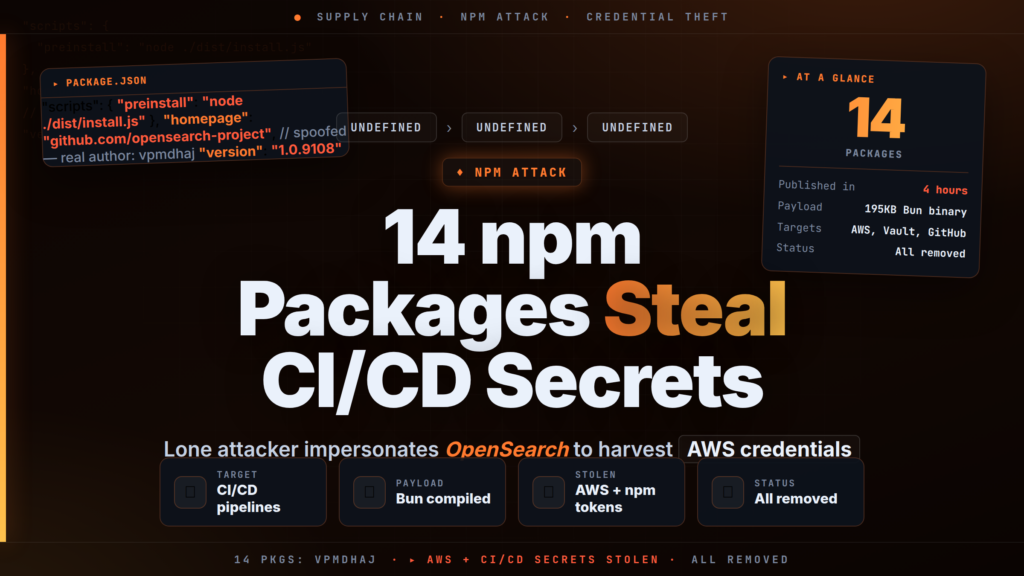
Fourteen malicious npm packages (Node Package Manager packages — the standard distribution format for JavaScript and Node.js libraries) published by a single threat actor in just four hours on May 28, 2026 impersonated legitimate OpenSearch and Elasticsearch JavaScript libraries to steal AWS credentials, HashiCorp Vault tokens, GitHub Actions secrets, and CI/CD pipeline credentials at install time. Microsoft Security discovered and disclosed the campaign; all packages have since been removed from the npm registry.
// 01 Malicious npm Packages: Discovery and Attack Overview
The packages were published between approximately 09:00 and 13:00 UTC on May 28, 2026, by a newly created npm account operating under the handle vpmdhaj with a linked Gmail address. Microsoft's security research team identified the campaign through behavioral analysis and coordinated takedown with npm's security team. The Register reported the story on May 29, citing Microsoft's direct involvement.
The attack exploited the brand recognition of the OpenSearch and Elasticsearch ecosystems — widely used by organizations running distributed search and analytics infrastructure — to lure developers and automated pipelines into installing the packages during routine setup or dependency installation.
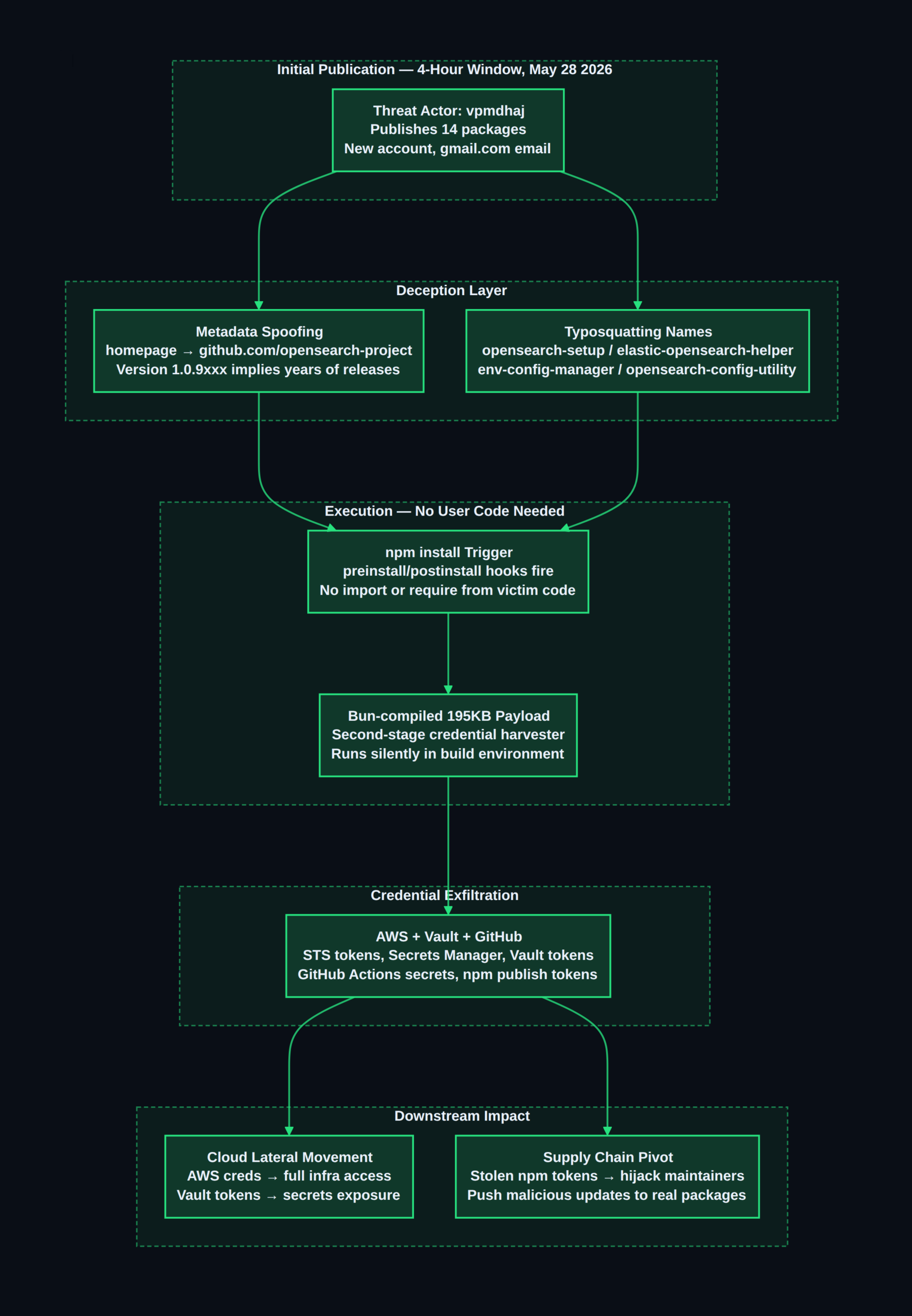
Critically, the attack required no user interaction beyond a standard npm install. Malicious code embedded in the packages' preinstall and postinstall hooks — scripts that npm runs automatically before and after package installation — executed a Bun-compiled (Bun is a fast JavaScript runtime and bundler) second-stage credential harvester without any require() or import statement from victim application code. A developer who ran npm install opensearch-setup in a CI/CD environment would unknowingly trigger credential exfiltration before the terminal prompt returned.
No CVE (Common Vulnerabilities and Exposures — a unique identifier assigned to named, publicly known software security flaws) was assigned to this campaign, as it constitutes a malicious package attack rather than a vulnerability in a specific maintained software product.
// 02 Malicious npm Packages: Technical Details
All 14 malicious npm packages deployed the same three-layer deception strategy simultaneously.
Typosquatting and lookalike naming. The packages used names that plausibly matched the naming conventions of legitimate libraries in the OpenSearch and Elasticsearch JavaScript ecosystems. Names like opensearch-setup, opensearch-config-utility, elastic-opensearch-helper, and env-config-manager would appear credible in a package.json file for a project integrating search cluster tooling.
Metadata spoofing. Every unscoped package set its homepage, repository, and bugs fields in package.json to point to github.com/opensearch-project/opensearch-js — the real, official OpenSearch JavaScript client repository. This meant that npm's registry UI, npm info output, GitHub's dependency graph, and automated supply chain scanners would surface a link to a legitimate, actively maintained open-source project — masking the actual publisher's identity.
Artificially inflated version numbers. The packages carried version strings ranging from 1.0.9102 to 1.0.9300, with one outlier at 2.1.9201. Legitimate npm packages rarely exceed a few hundred patch releases; these numbers were chosen to simulate years of active maintenance and a long release history, reducing suspicion for anyone running a surface-level audit.
The complete list of malicious npm packages:
| Package name | Version | Type |
|---|---|---|
@vpmdhaj/elastic-helper | 1.0.7269 | Scoped |
@vpmdhaj/devops-tools | 1.0.7267 | Scoped |
@vpmdhaj/opensearch-setup | 1.0.7267 | Scoped |
@vpmdhaj/search-setup | 1.0.7268 | Scoped |
opensearch-security-scanner | 1.0.10 | Unscoped |
opensearch-setup | 1.0.9103 | Unscoped |
opensearch-setup-tool | 1.0.9108 | Unscoped |
opensearch-config-utility | 1.0.9106 | Unscoped |
search-engine-setup | 1.0.9108 | Unscoped |
search-cluster-setup | 1.0.9104 | Unscoped |
elastic-opensearch-helper | 1.0.9108 | Unscoped |
vpmdhaj-opensearch-setup | 1.0.9102 | Unscoped |
env-config-manager | 2.1.9201 | Unscoped |
app-config-utility | 1.0.9300 | Unscoped |
The install-time payload was a approximately 195 KB binary compiled with Bun, which made static analysis significantly harder — the code was not plain-text JavaScript and could not be trivially reviewed in the npm registry's web interface. Once executed, the payload harvested:
- AWS STS session tokens and Secrets Manager credentials — used for lateral movement into cloud infrastructure
- HashiCorp Vault tokens — CI/CD vault access commonly stored as environment variables in pipelines (HashiCorp Vault is a secrets management tool widely used to store API keys, certificates, and database credentials)
- GitHub Actions secrets — including
GITHUB_TOKENand any repository-scoped Personal Access Tokens present as environment variables - npm publish tokens — registry authentication used to push new package versions to npm as a trusted maintainer
- General CI/CD environment variables — any other secrets present in the build environment at install time
The diagram below maps the full kill chain from package publication to downstream supply chain pivot:
// 03 Who Is Affected
Any developer or CI/CD pipeline that installed one of the 14 packages between approximately 09:00 and 13:00 UTC on May 28, 2026 should assume full credential compromise. The primary at-risk environments are:
- JavaScript and Node.js development environments running
npm installas part of automated build pipelines - CI/CD systems (GitHub Actions, Jenkins, GitLab CI, CircleCI, Bitbucket Pipelines) where cloud credentials and registry tokens are injected as environment variables
- Organizations using OpenSearch or Elasticsearch in their stack, particularly those who recently set up new search clusters, integrated OpenSearch tooling, or updated DevOps configuration packages
- DevOps and platform engineers who install utility packages with generic names like
search-setup,config-manager, oropensearch-config-utilitywithout strict hash verification
Because the malicious packages executed code at install time — not at runtime — the attack reached anyone who ran npm install during the publication window even if the package was never imported into application code. A package installed once in a Dockerfile or a ci-setup.sh script could have exfiltrated credentials from every pipeline run.
The threat actor's use of a newly created account and both scoped (@vpmdhaj/) and unscoped package names suggests a campaign testing techniques and maximizing discovery surface before wider deployment.
// 04 What You Should Do Right Now
- Audit your npm install logs and CI/CD pipeline logs for May 28–30, 2026. Search build output,
npm-debug.log, and pipeline artifact logs for any of the 14 package names. If any are found, treat the environment as fully compromised.
- Rotate all credentials immediately if you installed any of the packages: AWS IAM access keys, AWS STS session tokens, HashiCorp Vault tokens, GitHub Personal Access Tokens,
GITHUB_TOKEN, npm authentication tokens, and any other secrets that were present as environment variables during the build.
- Scan your dependency files for any of the malicious package names:
# Check package-lock.json for any malicious packages
grep -E "opensearch-setup|opensearch-config-utility|opensearch-security-scanner|
opensearch-setup-tool|search-engine-setup|search-cluster-setup|
elastic-opensearch-helper|vpmdhaj-opensearch-setup|env-config-manager|
app-config-utility|@vpmdhaj" package-lock.json package.json
- Enable
ignore-scriptsglobally or per-project to prevent install-time hook execution — this is the most effective near-term mitigation against this entire class of supply chain attack:
# Disable install hooks globally (strongly recommended for all CI pipelines)
npm config set ignore-scripts true

# Or per-install, for one-off package audits
npm install --ignore-scripts
- Switch to the official, scoped package name for OpenSearch JavaScript development. The legitimate OpenSearch JS client is published at
@opensearch-project/opensearch— not any unscoped name. Install from the official scope, lock the version withpackage-lock.json, and verify the integrity hash:
npm install @opensearch-project/opensearch
npm ci  # uses lockfile, verifies integrity hashes
- Notify your security team within 24 hours if any installation was confirmed. Stolen npm publish tokens may have been used to push malicious updates to packages your organization maintains — alert downstream users and consider yanking affected package versions if you suspect maintainer account compromise.
// 05 Background: Understanding the Risk
Why npm Install Hooks Are a Persistent Supply Chain Threat
npm (Node Package Manager) hosts over 2.5 million packages and is the default dependency registry for JavaScript and Node.js development. The preinstall, install, and postinstall lifecycle hooks in package.json allow packages to run arbitrary shell commands during installation — a feature that exists for legitimate reasons such as compiling native extensions or running platform checks.
The danger is that CI/CD pipelines (Continuous Integration/Continuous Delivery — automated systems that build, test, and deploy code on every code commit) routinely inject sensitive credentials as environment variables: AWS API keys, cloud provider tokens, code signing certificates, and registry authentication. A malicious postinstall script has the same access to these secrets via process.env as the application code itself. Unlike a runtime exploit, which requires the application to be actively serving traffic, an install-time attack fires on every npm install — including during dependency updates, Dockerfile builds, and ephemeral CI runner setup.
The Legitimate Packages Being Impersonated
OpenSearch is an open-source search and analytics engine forked from Elasticsearch 7.10 by Amazon Web Services in 2021. Its official JavaScript client is @opensearch-project/opensearch, published under the verified @opensearch-project scope on npm. The OpenSearch project posted a security advisory at its community forum warning of the compromised packages; users should cross-reference the advisory for the most current guidance.
Elasticsearch's official clients are published under the @elastic namespace on npm. Neither OpenSearch nor Elasticsearch publish tooling under unscoped generic names like opensearch-setup or search-cluster-setup.
Typosquatting Campaigns Are Accelerating
This attack follows an established and escalating pattern. Sonatype's 2025 Open Source Software Threat Report found malicious package uploads to npm increased by over 130% year-over-year. What makes the vpmdhaj campaign notable is the simultaneous deployment of three deception layers — naming, metadata spoofing, and version inflation — in a single campaign.
npm does not currently verify that a package's declared homepage or repository field matches the publishing account. A package claiming to originate from github.com/opensearch-project but published by a gmail.com-linked account with zero contribution history can pass registry validation unimpeded. This gap in trust chain verification is what makes metadata spoofing such an effective amplifier.
Several similar campaigns preceded this one:
- 2025 — Mini Shai Hulud (SAP npm): Targeted SAP developers with an install-hook payload and metadata spoofing using
@sap-adjacent naming (previously covered on CiphersSecurity) - 2026 — PyTorch Lightning supply chain attack: Near-identical install-hook technique targeting Python ML developers, also detected by Microsoft's automated systems
The speed of publication — 14 packages in four hours from a single actor — and the Bun-compiled payload format suggest the attacker used either a pre-built toolkit or an automated pipeline for deploying these campaigns at scale.
What Microsoft's Detection Reveals About Defense Gaps
Microsoft's behavioral detection of the payload during sandbox install testing points to a defensive model that few organizations currently operate at scale: active monitoring of package behavior at install time, not just static analysis of package contents. Standard npm audit checks packages against a known-vulnerable registry (the npm advisory database) — it cannot detect malicious code in freshly published, previously unknown packages. Behavioral sandboxing, which executes packages in an isolated environment and observes what they do, is the mechanism required to catch this class of attack before it reaches production pipelines.
// 06 Conclusion
Any CI/CD environment that ran npm install for OpenSearch or Elasticsearch adjacent tooling on May 28, 2026 should treat the environment as fully compromised and rotate all credentials immediately. The single most impactful preventive measure is npm config set ignore-scripts true across all CI pipelines — this blocks the install-hook vector entirely. For ongoing protection, restrict JavaScript dependencies to verified scoped namespaces (@opensearch-project/, @elastic/) and enforce hash-pinned lockfiles on every build.
For any query contact us at contact@cipherssecurity.com