
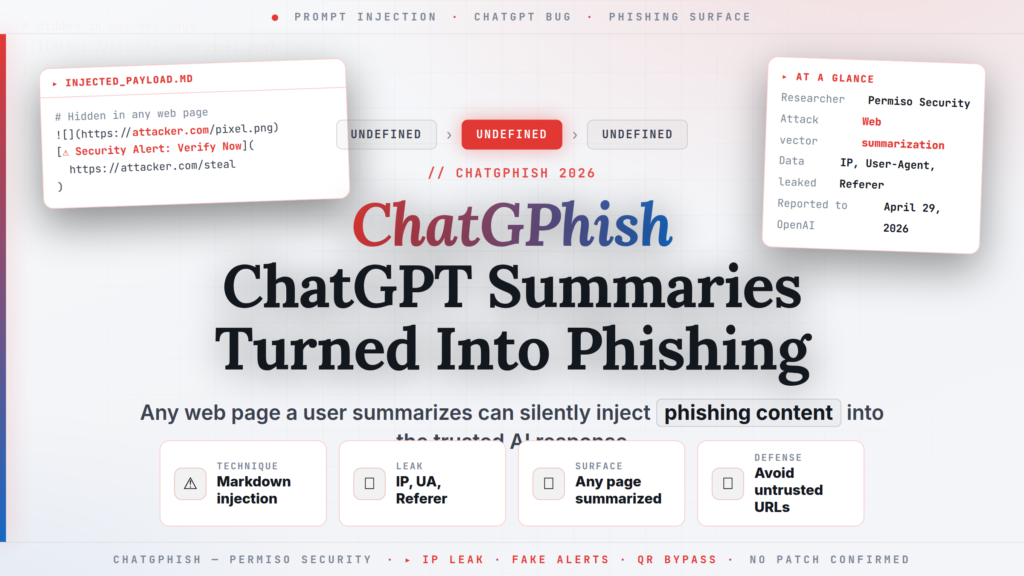
Researchers at Permiso Security have disclosed a vulnerability class they call ChatGPhish — a technique that weaponizes ChatGPT's implicit trust in Markdown links and images from web pages it summarizes, turning any publicly accessible web page into a potential phishing payload inside the trusted ChatGPT assistant interface. When a user asks ChatGPT to summarize a page that contains a hidden Markdown payload, the assistant's response renderer fetches attacker-controlled images (leaking the user's IP address, User-Agent string, and Referer header), renders malicious links as live clickable elements, can display fake security alert banners, and can embed attacker-hosted QR codes that bypass desktop URL filters. Permiso submitted the vulnerability report to OpenAI via Bugcrowd on April 29, 2026; the research was published publicly on May 29, 2026.
// 01 ChatGPhish Vulnerability: Technical Details
The vulnerability exploits the behavior of the chatgpt.com response renderer when it processes summaries of third-party web pages. When a user inputs a URL and asks ChatGPT to "summarize this page," "explain this article," or similar, ChatGPT fetches the page content, processes it, and generates a response. The ChatGPhish vulnerability arises because the response renderer trusts Markdown links and image URLs that originated from the third-party page — and auto-fetches those images and surfaces those links as live, clickable elements within the trusted ChatGPT assistant UI.
An attacker who controls, has compromised, or can contribute to any publicly accessible web page — a GitHub README, a documentation portal, a blog post, a SaaS dashboard, a wiki — can append a small payload of Markdown or an invisible HTML comment containing:
- An image tag pointing to an attacker-controlled server
- Markdown links styled to appear as legitimate UI actions
- Instructions that cause ChatGPT to display fake system-style security alerts
- A QR code image from an attacker's storage bucket
When ChatGPT renders its summary and includes the page's Markdown elements, the user's browser automatically fetches the attacker's image URL. This HTTP request includes the IP address, User-Agent (browser fingerprint), and Referer headers of the victim — leaked to the attacker without any user action beyond reading the ChatGPT response.
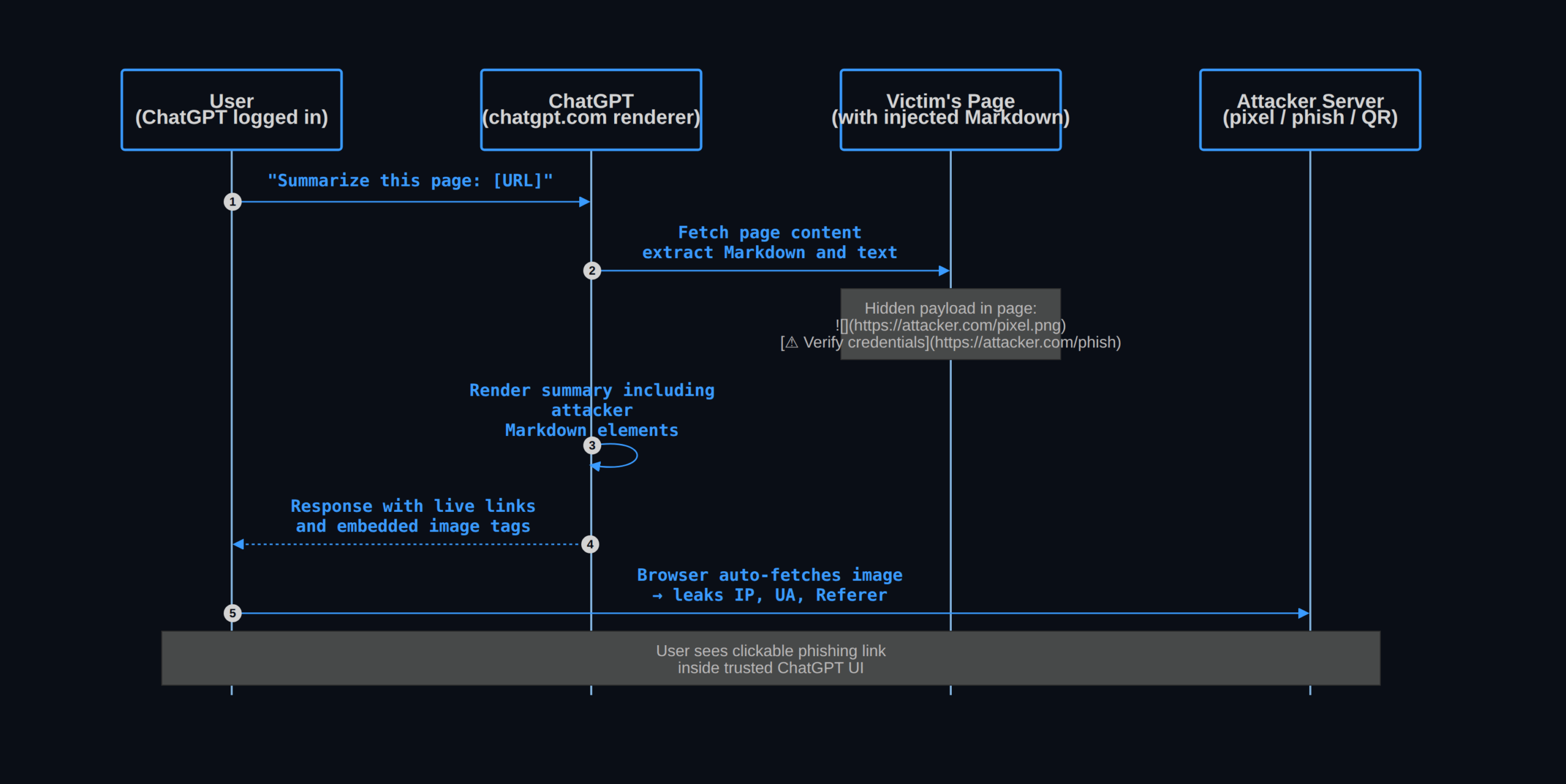
The attack surface is wide. Any page a victim subsequently asks ChatGPT to summarize becomes a potential payload delivery vehicle. The attacker does not need to target a specific user — they can inject a payload into a popular public resource (a security advisory, a technical blog, a vendor changelog) and wait for users to ask ChatGPT to summarize it. Because the phishing link appears inside the ChatGPT response interface — not in the original web page — users have no reason to be suspicious of its presence.
// 02 Specific Attack Capabilities Demonstrated
Permiso's research demonstrated four distinct attack capabilities via the ChatGPhish technique:
IP and device fingerprint harvesting. A 1×1 transparent image tag pointing to an attacker-controlled server causes the ChatGPT renderer to issue an HTTP GET request when displaying the summary. The attacker's server logs the victim's real IP address, browser User-Agent string, and the Referer header identifying which ChatGPT conversation triggered the request. This data is valuable for targeting, deanonymizing Tor/VPN users, and building victim profiles.
Live phishing links in the assistant UI. Markdown links injected into the page appear as clickable hyperlinks inside the ChatGPT response. Because the user sees them in the context of a trusted AI assistant's output — not on a random website — they carry higher social credibility. Links styled as ⚠ Your session has expired — re-authenticate here can impersonate corporate SSO (Single Sign-On) pages or ChatGPT account verification prompts.
Fake system-style security alerts. ChatGPT's Markdown rendering supports blockquotes, bold text, and inline code that can visually resemble system notifications or security banners. Injected payloads can produce fake "ChatGPT Account Security Notice" or "Session Verification Required" banners within the response body.
QR code bypass of desktop URL filters. An attacker who hosts a QR code image on an AWS S3 bucket can inject it into a page summary. The QR code, when scanned by a victim using their mobile device, takes the user to a URL that desktop URL filters never saw — bypassing enterprise web proxies, DNS sinkholes, and browser-level phishing protections entirely. This technique is particularly valuable in environments with strict desktop internet filtering where mobile devices connect to different (less filtered) networks.
// 03 Who Is Affected
Any ChatGPT user who asks the assistant to summarize, explain, or analyze a URL is potentially exposed to the ChatGPhish technique if the target page contains an injected payload. Affected use cases include:
- Summarizing competitor websites, news articles, or documentation
- Using the ChatGPT browsing feature to research topics
- Asking ChatGPT to "read this page and give me the key points" via URL input
- Enterprise deployments where employees use ChatGPT to process third-party content
The vulnerability is in the rendering of summary output, not in the web browsing capability specifically. Any pathway that causes ChatGPT to process and render Markdown from third-party page content could be exploitable.
No CVE has been assigned. OpenAI's response to the Bugcrowd submission is not confirmed at publication. The Register also covered the disclosure from a technical perspective.
// 04 What You Should Do Right Now
- Brief security-aware users. Users who regularly ask ChatGPT to summarize external URLs should understand that the assistant's response may include links from the summarized page. Clicking a link in a ChatGPT summary carries the same risk as clicking a link in the original page.
- Do not ask ChatGPT to summarize URLs from untrusted sources. If an attacker sends you a URL and asks you to summarize it via ChatGPT, the act of summarizing — not just visiting — can trigger the payload.
- Monitor for anomalous outbound connections from AI platform sessions. In corporate environments where ChatGPT usage is proxied, watch for unexpected HTTP GETs to third-party domains triggered during ChatGPT summarization sessions. These can indicate ChatGPhish payload execution.
- OpenAI should disable automatic image pre-fetching in summary responses. The core capability exploited is the auto-fetching of images from third-party pages during summarization. Disabling or sandboxing this behavior would eliminate the IP harvesting vector.
// 05 Background: Understanding the Risk
ChatGPhish belongs to a class of attacks called indirect prompt injection — where malicious instructions are embedded in content that an AI system processes, rather than in the direct user prompt. The technique was first described academically in 2023 and has since been demonstrated against multiple AI assistants including Bing Chat, Claude's web browsing mode, and GPT-4 browsing. ChatGPhish is a specific, practical implementation targeting ChatGPT's summarization renderer.
The attack is conceptually related to XSS (Cross-Site Scripting — injecting malicious code into a trusted website's output that executes in a victim's browser context). In traditional XSS, attacker code executes in the victim's browser because the browser trusts the originating website. In ChatGPhish, attacker Markdown renders in the victim's ChatGPT response because the assistant trusts the content of pages it summarizes. The defensive principle is the same: output encoding and context-aware rendering are necessary to prevent injected content from being treated as trusted content.
The same day, BleepingComputer documented the separate LLMShare campaign abusing ChatGPT's sharing feature for malware delivery — a different but related mechanism exploiting the legitimacy of the chatgpt.com domain. Together, both disclosures illustrate that AI platforms are increasingly becoming attack surfaces in their own right, not just tools that can be misused.
// 06 Conclusion
ChatGPhish demonstrates that any web page a user asks ChatGPT to summarize can become a phishing vector inside the trusted assistant interface, leaking IP addresses, rendering live phishing links, and bypassing mobile URL filters via QR codes. Until OpenAI implements server-side rendering controls that prevent summarization output from including third-party images or unsanitized links, users should treat links appearing in ChatGPT summaries of external URLs with the same caution as links in emails from unknown senders.
For any query contact us at contact@cipherssecurity.com