This room is the last in the Nmap series (part of the Introduction to Network Security module). In this room (Nmap Post Port Scans), we focus on the steps that follow port-scanning: in particular, service detection, OS detection, Nmap scripting engine, and saving the scan results.
In the first room of this series, we have learned how Nmap can enumerate targets, discover live hosts, and use reverse-DNS to find interesting names. The second and third rooms of the series focused on the basic and advanced types of scans for network ports.
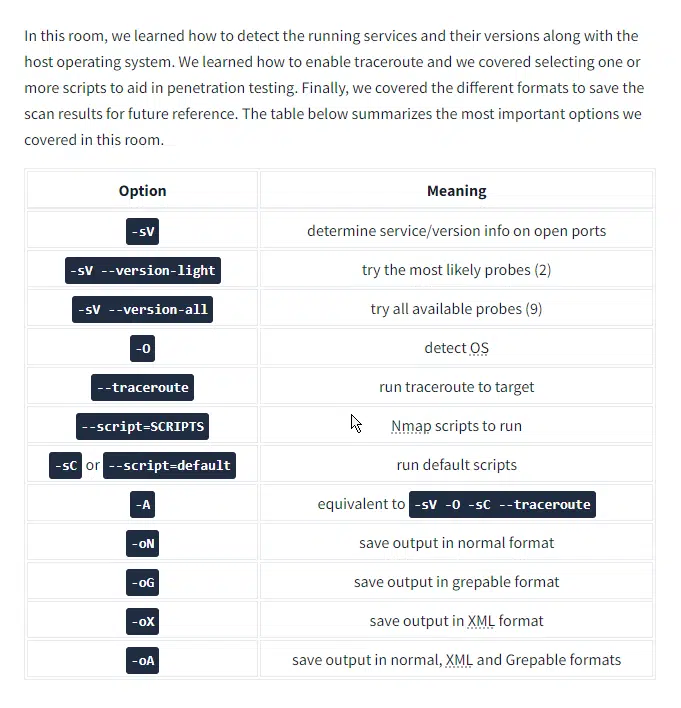
In the last room, as shown in the figure below, we focus on how Nmap can be used to:
- Detect versions of the running services (on all open ports)
- Detect the OS based on any signs revealed by the target
- Run Nmap’s traceroute
- Run select Nmap scripts
- Save the scan results in various formats
// 01 Task 2 Service Detection Nmap Post Port
Question: Start the target machine for this task and launch the AttackBox. Run nmap -sV --version-light 10.10.49.191via the AttackBox. What is the detected version for port 143?
Answer: Dovecot imapd
Question: Which service did not have a version detected with --version-light?
Answer: rpcbind
// 02 Task 3 OS Detection and Traceroute Nmap Post Port
Question: Run nmap with -O option against 10.10.49.191. What OS did Nmap detect?
Answer: linux
// 03 Task 4 Nmap Scripting Engine (NSE) Nmap Post Port
A script is a piece of code that does not need to be compiled. In other words, it remains in its original human-readable form and does not need to be converted to machine language.
Many programs provide additional functionality via scripts; moreover, scripts make it possible to add custom functionality that did not exist via the built-in commands.
Similarly, Nmap provides support for scripts using the Lua language. A part of Nmap, Nmap Scripting Engine (NSE) is a Lua interpreter that allows Nmap to execute Nmap scripts written in Lua language. However, we don’t need to learn Lua to make use of Nmap scripts.
Question: Knowing that Nmap scripts are saved in /usr/share/nmap/scripts on the AttackBox. What does the script http-robots.txt check for?
Answer: disallowed entries
Question: Can you figure out the name for the script that checks for the remote code execution vulnerability MS15-034 (CVE2015-1635)?
Answer: http-vuln-cve2015-1635
Question: Launch the AttackBox if you haven’t already. After you ensure you have terminated the VM from Task 2, start the target machine for this task. On the AttackBox, run Nmap with the default scripts -sC against 10.10.49.191. You will notice that there is a service listening on port 53. What is its full version value?
Answer: 9.9.5-9+deb8u19-Debian
Question: Based on its description, the script ssh2-enum-algos “reports the number of algorithms (for encryption, compression, etc.) that the target SSH2 server offers.” What is the name of the key exchange algorithms (kex_algorithms) that relies upon “sha1” and is supported by
Answer: diffie-hellman-group14-sha1
// 04 Task 5 Saving the Output N
Whenever you run a Nmap scan, it is only reasonable to save the results in a file. Selecting and adopting a good naming convention for your filenames is also crucial. The number of files can quickly grow and hinder your ability to find a previous scan result. The three main formats are:
- Normal
- Grepable (
grepable) - XML
There is a fourth one that we cannot recommend:
- Script Kiddie
Question: Check the attached Nmap logs. How many systems are listening on the HTTPS port? Nmap Post Port
Answer: 3
Question: What is the IP address of the system listening on port 8089? Nmap Post Port
Answer: 172.17.20.147