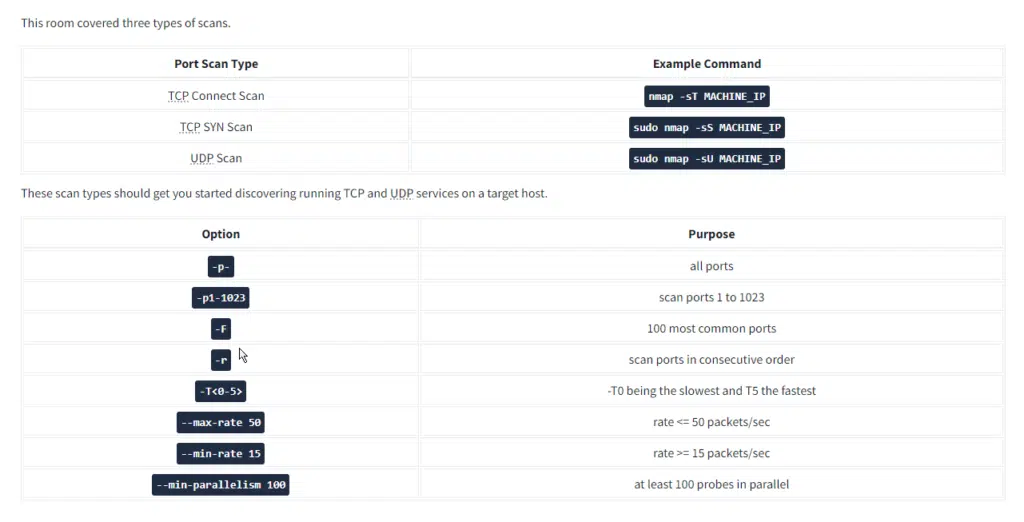
This room is the second Nmap Basic Port Scans in the Nmap series (part of the Introduction to Network Security module).
In the previous room, we focused on discovering online systems. So far, we have covered three steps of a Nmap scan:
- Enumerate targets
- Discover live hosts
- Reverse-DNS lookup
The next step would be checking which ports are open and listening and which ports are closed. Therefore, in this room and the next one, we focus on port scanning and the different types of port scans used by nmap. This room explains:
- TCP connect port scan
- TCP SYN port scan
- UDP port scan
Moreover, we discuss the different options to specify the ports, the scan rate, and the number of parallel probes.
// 01 Task 2 TCP and UDP Ports Nmap Basic
Question: Which service uses UDP port 53 by default?
Answer: DNS
Question: Which service uses TCP port 22 by default?
Answer: SSh
Question: How many port states does Nmap consider?
Answer: 6
Question: Which port state is the most interesting to discover as a pentester?
Answer: open
However, in practical situations, we need to consider the impact of firewalls. For instance, a port might be open, but a firewall might be blocking the packets. Therefore, Nmap considers the following six states:
- Open: indicates that a service is listening on the specified port.
- Closed: indicates that no service is listening on the specified port, although the port is accessible. By accessible, we mean that it is reachable and is not blocked by a firewall or other security appliances/programs.
- Filtered: means that Nmap cannot determine if the port is open or closed because the port is not accessible. This state is usually due to a firewall preventing Nmap from reaching that port. Nmap’s packets may be blocked from reaching the port; alternatively, the responses are blocked from reaching Nmap’s host.
- Unfiltered: means that Nmap cannot determine if the port is open or closed, although the port is accessible. This state is encountered when using an ACK scan
-sA. - Open|Filtered: This means that Nmap cannot determine whether the port is open or filtered. Nmap Basic
- Closed|Filtered: This means that Nmap cannot decide whether a port is closed or filtered. Nmap Basic
// 02 TCP Flags Nmap Basic
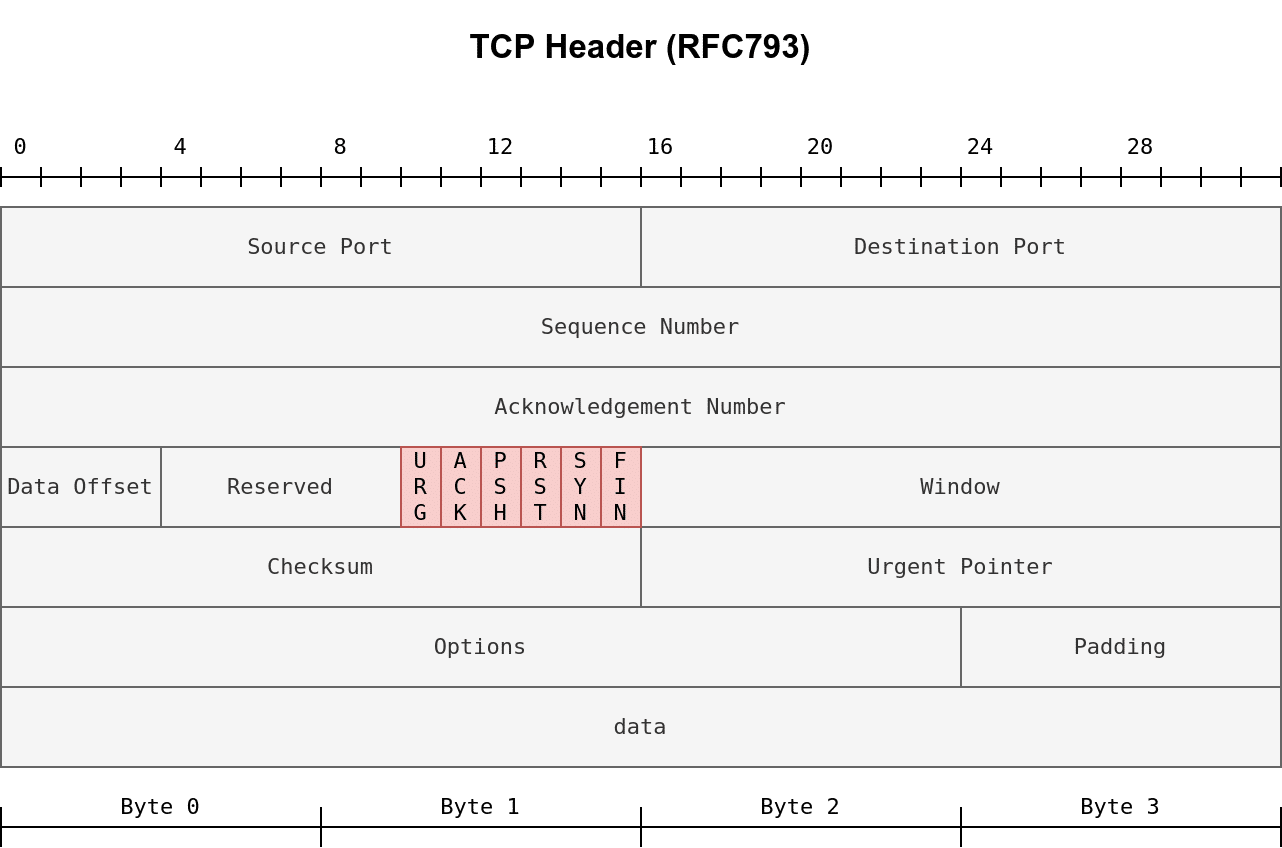
- URG: Urgent flag indicates that the urgent pointer filed is significant. The urgent pointer indicates that the incoming data is urgent, and that a TCP segment with the URG flag set is processed immediately without consideration of having to wait on previously sent TCP segments.
- ACK: Acknowledgement flag indicates that the acknowledgement number is significant. It is used to acknowledge the receipt of a TCP segment.
- PSH: Push flag asking TCP to pass the data to the application promptly. Nmap Basic
- RST: Reset flag is used to reset the connection. Another device, such as a firewall, might send it to tear a TCP connection. This flag is also used when data is sent to a host and there is no service on the receiving end to answer. Nmap Basic
- SYN: Synchronize flag is used to initiate a TCP 3-way handshake and synchronize sequence numbers with the other host. The sequence number should be set randomly during TCP connection establishment.
- FIN: The sender has no more data to send. Nmap Basic
Question: What 3 letters represent the Reset flag?
Answer: RST
Question: Which flag needs to be set when you initiate a TCP connection (first packet of TCP 3-way handshake)?
Answer: SYN
// 03 Task 4 TCP Connect Scan Nmap Basic
Question: Launch the VM. Open the AttackBox and execute nmap -sT 10.10.180.186 via the terminal. A new service has been installed on this VM since our last scan. Which port number was closed in the scan above but is now open on this target VM?
Answer: 110
Question: What is Nmap’s guess about the newly installed service?
Answer: pop3
// 04 Task 5 TCP SYN Scan
Question: Launch the VM. Some new server software has been installed since the last time we scanned it. On the AttackBox, use the terminal to execute nmap -sS 10.10.38.225. What is the new open port?
Answer: 6667
Question: What is Nmap’s guess of the service name?
Answer: irc
// 05 Task 6 UDP Scan
Question: Launch the VM. On the AttackBox, use the terminal to execute nmap -sU -F -v 10.10.212.229. A new service has been installed since the last scan. What is the UDP port that is now open?
Answer: 53
Question: What is the service name according to Nmap?
Answer: domain
// 06 Task 7 Fine-Tuning Scope and Performance
Question: What is the option to scan all the TCP ports between 5000 and 5500?
Answer: -p5000-5500
Question: How can you ensure that Nmap will run at least 64 probes in parallel?
Answer: –min-parallelism=64
Question: What option would you add to make Nmap very slow and paranoid?
Answer: -T0