
Hello guys, in this article I will explain how and why we should use the nslookup tool. It is a command-line tool that is used to diagnose and troubleshoot DNS (Domain Name System) related issues.
With the help of this article, you can learn how to use nslookup with examples and why we use it. So, let’s start:
// 01 what is nslookup
It is a command-line utility that allows you to perform DNS queries to find information about a particular domain name or IP address. It is commonly used to troubleshoot DNS issues, as it can provide information about the DNS records for a given domain, including the IP address and DNS server used for that domain.
To use it, you must enter the name or IP address of the domain you want to look up, followed by the name of the server you want to use. For example, if you want to look up the IP address for testme.com and use the DNS server at 8.8.8.8, you would type the following command:
nslookup example.com 8.8.8.8// 02 Its command is used for
- To find the IP address of any domain.
- To find domain server details.
- To find mail server details.
- To find the class of any domain.
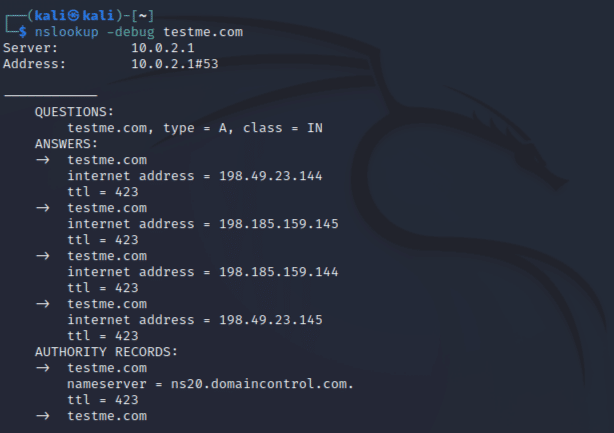
- To find detailed information about DNS and response.
Find the IP address of any domain
Syntax:-
nslookup <DOMAIN NAME>Example:-
nslookup testme.com Output:-

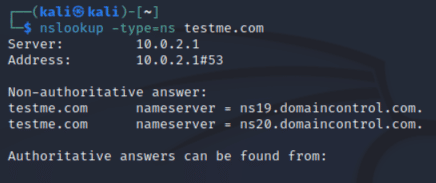
Find name server from DNS command
Syntax:-
nslookup -type=ns <DOMAIN NAME>Example:-
nslookup -type=ns testme.comOutput:-
Find mail records
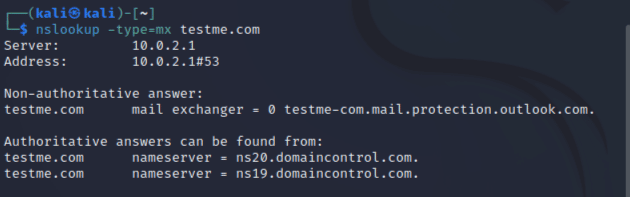
Syntax:-
nslookup -type=mx <DOMAIN NAME>Example:-
nslookup -type=mx testme.comOutput:-
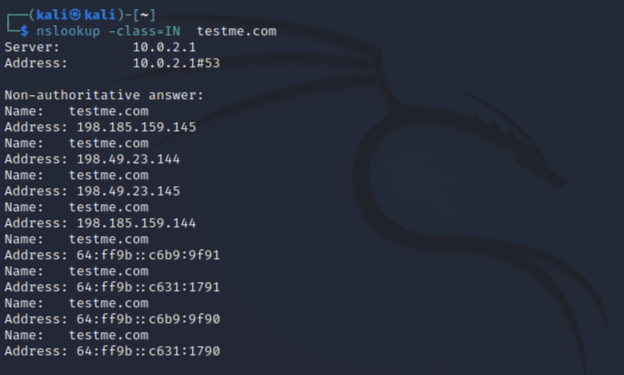
Find the class of any domain
Syntax:-
nslookup -class=IN <DOMAIN NAME>Example:-
nslookup -class=IN testme.comOutput:-
Find detailed information about DNS and response
Syntax:-
nslookup -debug <DOMAIN NAME>Example:-
nslookup -debug testme.comOutput:-
// 03 Why do we use it
- It allows users to query DNS records and retrieve information about domain names and IP addresses.
- It provides a user-friendly interface for users to perform DNS queries without having to use complex command line commands.
- It allows users to troubleshoot DNS issues and identify potential problems with DNS configuration.
- It allows users to view detailed information about DNS records, including their type, data, and expiration date.
- It allows users to perform recursive DNS queries, which can help identify issues with DNS servers and the DNS resolution process.
- It allows users to query multiple DNS servers at once, which can be useful for testing DNS configuration and identifying potential DNS issues.
- It provides detailed error messages and diagnostic information, which can help users identify and resolve DNS issues more quickly and efficiently.
- It is a free and open-source tool that is available on most operating systems, making it widely accessible to users.
keywords:- nslookup, nslookup command, what is nslookup, nslookup command, command for nslookup.