
A fake BlueWallet cryptocurrency wallet website (update-bluewallet[.]com) is actively distributing macOS malware that steals passwords, drains crypto wallets, hijacks clipboard addresses to redirect transactions to attacker-controlled wallets, and exfiltrates data through the Telegram Bot API. Discovered by Stefan Dasic, a security researcher at Malwarebytes, the malware uses an AppleScript delivery method that completely bypasses macOS Gatekeeper (Apple's built-in application vetting system), leverages only native macOS tools to avoid endpoint detection, and operates without any distinguishing executable that would trigger security warnings. BlueWallet itself has not been compromised; the attack targets users who search for the wallet and arrive at the fake download site.
// 01 Fake BlueWallet macOS Malware: Technical Details
The legitimate BlueWallet is an open-source Bitcoin and Lightning Network wallet available from the App Store and the official bluewallet.io domain. The malware distribution site update-bluewallet[.]com has no affiliation with the BlueWallet project; it is attacker-registered infrastructure mimicking the legitimate brand.
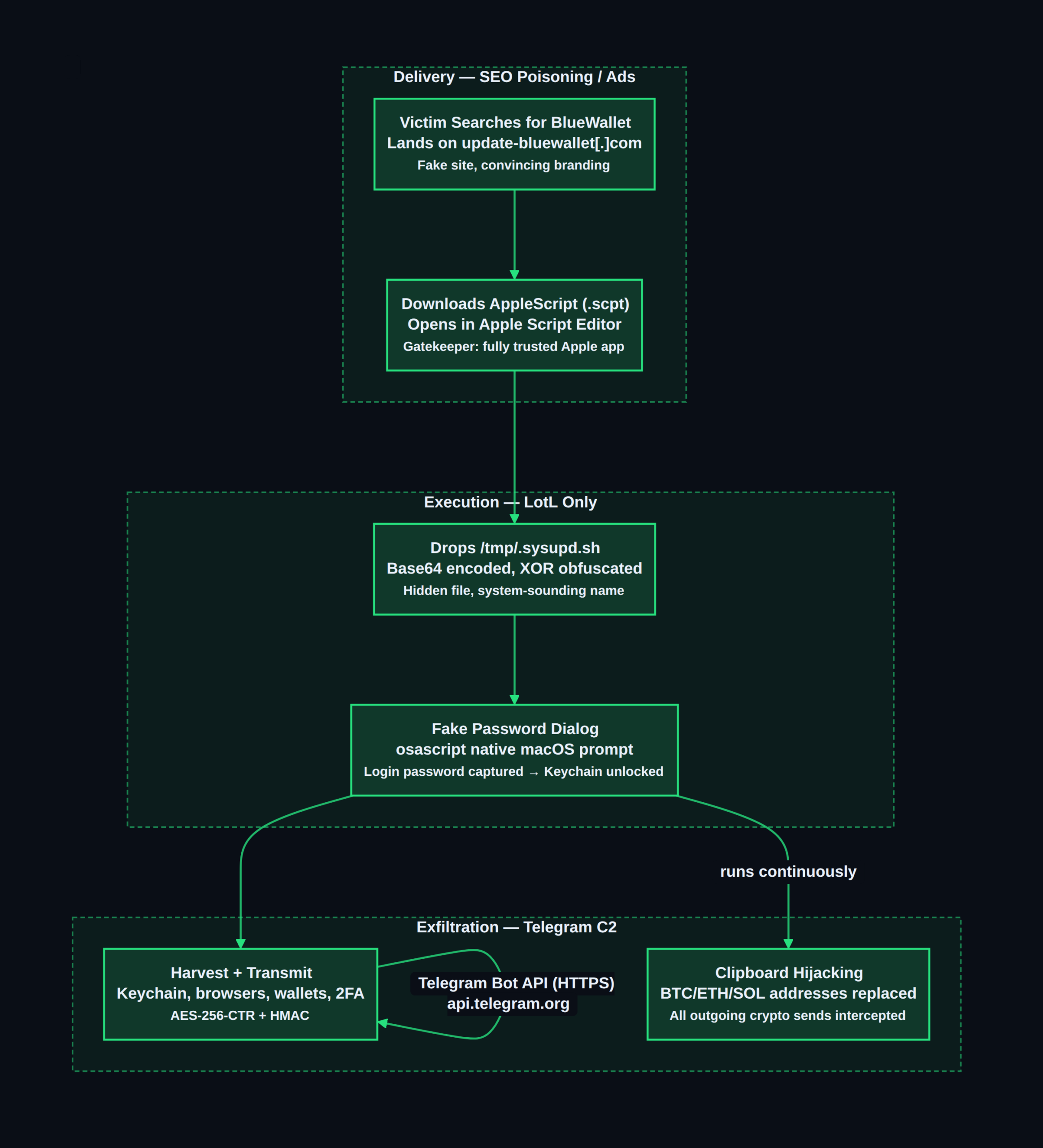
The delivery mechanism exploits a fundamental characteristic of macOS: AppleScript (.scpt) files open in Script Editor, Apple's own application, when double-clicked. Apple-signed applications like Script Editor have no Gatekeeper restrictions. When a user opens a .scpt file and clicks "Run," they are running code through a fully trusted Apple application — Gatekeeper has no mechanism to flag or block this. The fake site presents download instructions that direct users to open an AppleScript file in Script Editor and press "Run," framed as a necessary installation step.
Once executed, the AppleScript:
- Drops a base64-encoded payload, decoded and written to
/tmp/.sysupd.sh— a hidden file (dot-prefixed) with a system-sounding name designed to blend with legitimate temp files. - Executes
/tmp/.sysupd.shvia the native/bin/bashshell. - Displays a fake "macOS requires your password" dialog using
osascript -e 'display dialog "macOS requires your password" default answer "" with hidden answer'. When the user enters their login password (expecting a routine system prompt), the password is captured and transmitted to the attacker. This password unlocks the macOS Keychain — giving the malware access to every stored credential.
The shell script uses XOR obfuscation with the hardcoded key swckR9JCD2Uu to conceal its configuration block, and communicates with its command-and-control (C2) infrastructure exclusively through the Telegram Bot API over standard HTTPS. This C2 channel is particularly effective at evading network monitoring because Telegram is a legitimate, widely-used messaging service — connections to api.telegram.org are indistinguishable from normal Telegram application traffic at the network layer.
All tools used during execution — curl, ditto, launchctl, osascript, /bin/bash — are native macOS system binaries, a technique known as "Living off the Land" (LotL). This approach produces no file hashes or process names associated with known malware, reducing detection efficacy for endpoint security tools that rely on signature matching.
// 02 What This Malware Steals
The scope of data targeted makes this malware particularly destructive for cryptocurrency holders:
Credentials:
- macOS Keychain contents (unlocked by the captured login password)
- Saved passwords and session cookies from Chrome-family, Firefox-family, and Safari browsers
- Password managers: LastPass, 1Password, Dashlane, Bitwarden
Cryptocurrency:
- Desktop wallet applications: Electrum, Exodus, Atomic Wallet, and others
- Browser cryptocurrency extensions: MetaMask, Phantom, Keplr, and related
- Files with extensions
.wallet,.key,.seed,.txt,.pdf(scanning for seed phrases stored in documents) - Clipboard hijacking: The malware continuously monitors the clipboard and replaces any copied cryptocurrency address with attacker-controlled addresses:
- BTC:
bc1qrmj4ggshddhnxx3rxwvsu8pe9ut6cgx8mx364e - ETH:
0x2B871703122064e45d77146a6D5203da3bD192FA - SOL:
8dtdRQePrKz97FszwMEa4QvptdAAcbAFs7kBojr5Mz3v
Communications and infrastructure:
- Telegram session data
- Discord session data
- AWS credentials
- SSH keys
- GnuPG keys
- Kubernetes configuration files
- Google Authenticator, Authy, and Microsoft Authenticator 2FA data
The clipboard hijacking deserves particular attention because it is silent, real-time, and irrecoverable: any cryptocurrency transaction initiated on an infected Mac will redirect funds to the attacker even if the user manually types or copies the correct destination address from their wallet interface, because the malware intercepts the clipboard paste event.
// 03 Indicators of Compromise
File Hash (SHA-256):
216277bdb7998b48852024fc8b5853c3dc50b3857fd22afd1320b884bcaa0a61
Malicious Domains:
update-bluewallet[.]com— fake BlueWallet distribution siteprojects2026box[.]com— secondary attacker infrastructure
Attacker Cryptocurrency Addresses (for wallet blocklisting):
- BTC:
bc1qrmj4ggshddhnxx3rxwvsu8pe9ut6cgx8mx364e - ETH:
0x2B871703122064e45d77146a6D5203da3bD192FA - SOL:
8dtdRQePrKz97FszwMEa4QvptdAAcbAFs7kBojr5Mz3v
Filesystem artifacts:
/tmp/.sysupd.sh— hidden malicious shell script~/Library/LaunchAgents/— check for unfamiliar.plistpersistence files
// 04 What You Should Do Right Now
- Check for the shell script:
- Audit LaunchAgents for unfamiliar entries:
- Run Malwarebytes for Mac — updated definitions detect this specific threat.
- If infected: disconnect from the network immediately before doing anything else, to stop active C2 communication.
- Change all passwords from a separate, clean device — not on the potentially infected Mac. Assume every saved password in every browser and every password manager was exfiltrated.
- Move all cryptocurrency to new wallets generated on a clean device. Treat every seed phrase, private key, and wallet address that ever existed on the infected Mac as fully compromised — even those stored in "secure" applications. Generate new wallets on a separate clean machine and transfer funds to those new addresses.
- Rotate all developer credentials on a clean device: AWS access keys, SSH keys, GPG keys, Kubernetes service account tokens.
- Perform a full macOS reinstall from a clean Apple silicon or Intel boot environment. Given the breadth of potential exfiltration (Keychain, 2FA seeds, session tokens), in-place cleanup cannot provide assurance of full remediation.
- Check clipboard before every cryptocurrency transaction. On any macOS device, even after cleanup, verify that the destination address in your transaction exactly matches what you intend to send — do not assume clipboard contents are unmodified.
“bash ls -la /tmp/ | grep sysupd “
“bash ls -la ~/Library/LaunchAgents/ “
// 05 Background: Understanding the Risk
Fake software download sites targeting macOS cryptocurrency users represent a sustained, evolving threat category in 2026. Stefan Dasic has tracked a consistent series of these campaigns throughout the year: a fake CleanMyMac site distributing the SHub Stealer in March 2026, a fake ChatGPT download delivering the Odyssey Stealer in May 2026, and a fake Claude site distributing PlugX in April 2026. All share the same structural pattern: a convincing fake site, an AppleScript-based delivery mechanism that bypasses Gatekeeper, LotL execution using native macOS tools, and Telegram Bot API for exfiltration.
The AppleScript delivery technique is a direct response to Apple's security improvements. macOS Gatekeeper and notarization requirements mean that unsigned executables now generate prominent security warnings before running. By routing delivery through Script Editor — an Apple-signed application — the malware sidesteps these warnings entirely. The technique works on all modern macOS versions and requires only that the victim be convinced to click "Run" in Script Editor, which the fake site achieves through social engineering.
Clipboard hijacking for cryptocurrency theft is increasingly a standard capability in the macOS infostealer ecosystem. The attack is particularly effective because:
- Most cryptocurrency users copy-paste wallet addresses rather than typing them manually, given their length and complexity
- The substitution happens in real time, affecting only the clipboard content — the wallet application's display may still show the correct address
- There is no reliable visual indicator that the clipboard has been modified
- Cryptocurrency transactions are irreversible by design
The Telegram Bot API as a C2 transport continues to be a preferred choice for macOS stealer operators. Its HTTPS encryption prevents content inspection by network appliances, its high traffic volumes make individual bot connections statistically invisible, and blocking api.telegram.org at the network perimeter would break the legitimate Telegram application for users who depend on it. Organizations can use DNS-based blocking of specific Telegram bot token patterns or anomaly detection on unusually high-frequency connections to Telegram domains as a detection layer.
// 06 Conclusion
A convincing fake BlueWallet site is actively distributing AppleScript-based macOS malware that steals everything from your Keychain to your seed phrases, hijacks cryptocurrency clipboard addresses in real time, and exfiltrates data through Telegram while bypassing Gatekeeper entirely. If you or anyone in your organization has downloaded BlueWallet recently, verify the source is bluewallet.io — any other domain is a fake. Enable Malwarebytes for Mac, move crypto to fresh wallets on a clean device, and treat every credential on a potentially exposed Mac as compromised.
For any query contact us at contact@cipherssecurity.com