

This room (Snort) expects you to be familiar with basic Linux command-line functionalities like general system navigation and Network fundamentals (ports, protocols and traffic data). The room aims to encourage you to start working with Snort to analyse live and captured traffic.
Before joining this room, we suggest completing the ‘Network Fundamentals’ module. If you have general knowledge of network basics and Linux fundamentals, you will be ready to begin! If you feel you need assistance in the Linux command line, you can always refer to our “Linux Fundamentals” rooms (here 1 2 3);
IT is an open-source, rule-based Network Intrusion Detection and Prevention System (NIDS/NIPS). It was developed and still maintained by Martin Roesch, open-source contributors, and the Cisco Talos team.
The official description: “Snort is the foremost Open Source Intrusion Prevention System (IPS) in the world. Snort IPS uses a series of rules that help define malicious network activity and uses those rules to find packets that match against them and generate alerts for users.”
// 01 Task 2: Interactive Material and VM
Question: Navigate to the Task-Exercises folder and run the command “./.easy.sh” and write the output
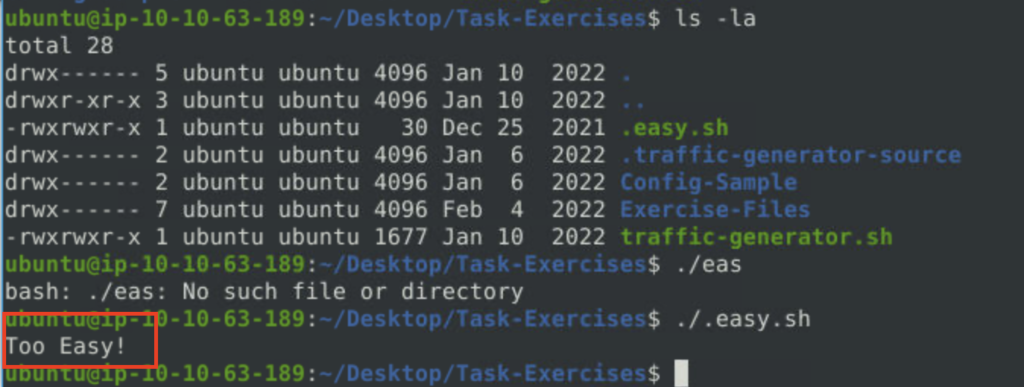
Answer: Too Easy
// 02 Task 3 Introduction to IDS/IPS
Question: Which mode can help you stop the threats on a local machine?
Answer: HIPS
Question: Which snort mode can help you detect threats on a local network?
Answer: NIDS
Question: Which snort mode can help you detect the threats on a local machine?
Answer: HIDS
Question: Which snort mode can help you stop the threats on a local network?
Answer: NIPS
Question: Which mode works similar to NIPS mode?
Answer: NBA
Question: According to the official description of the snort, what kind of NIPS is it?
Answer: full-blown
Question: NBA training period is also known as …
Answer: baselining
// 03 Task 4 First Interaction with Sno.
Question: Run the Snort instance and check the build number.
Answer: 149
Question: Test the current instance with “/etc/snort/snort.conf” file and check how many rules are loaded with the current build.
Answer: 4151
Question: Test the current instance with “/etc/snort/snortv2.conf” file and check how many rules are loaded with the current build.
Answer: 1
// 04 Task 5 Operation Mode 1: Sniffer Mode
Question: You can practice the parameter combinations by using the traffic-generator script.
Answer: No Answer Needed
// 05 Task 6 Operation Mode 2: Packet Logger Mode
nvestigate the traffic with the default configuration file with ASCII mode.
sudo snort -dev -K ASCII -l .
Execute the traffic generator script and choose “TASK-6 Exercise”. Wait until the traffic ends, then stop the Snort instance. Now analyse the output summary and answer the question.
sudo ./traffic-generator.sh
Question: Now, you should have the logs in the current directory. Navigate to folder “145.254.160.237”. What is the source port used to connect port 53?
Answer: 3009
Question: Use snort.log.1640048004
Read the snort.log file with Snort; what is the IP ID of the 10th packet?
snort -r snort.log.1640048004 -n 10
Answer: 49313
Question: Read the “snort.log.1640048004″ file with Snort; what is the referer of the 4th packet?
Answer: http://www.ethereal.com/development.html
Question: Read the “snort.log.1640048004″ file with Snort; what is the Ack number of the 8th packet?
Answer: 0x38AFFFF3
Question: Read the “snort.log.1640048004″ file with Snort; what is the number of the “TCP port 80” packets?
Answer: 41
// 06 Task 7 Operation Mode 3: IDS/IPS
Investigate the traffic with the default configuration file.
sudo snort -c /etc/snort/snort.conf -A full -l .
Execute the traffic generator script and choose “TASK-7 Exercise”. Wait until the traffic stops, then stop the Snort instance. Now analyse the output summary and answer the question.
sudo ./traffic-generator.sh
Question: What is the number of the detected HTTP GET methods?
Answer: 2
Question: You can practice the rest of the parameters by using the traffic-generator script.
Answer: No Answer Needed
// 07 Task 8 Operation Mode 4: PCAP Investigation
Investigate the mx-1.pcap file with the default configuration file.
sudo snort -c /etc/snort/snort.conf -A full -l . -r mx-1.pcap
Question: What is the number of the generated alerts?
Answer: 170
Question: Keep reading the output. How many TCP Segments are Queued?
Answer: 18
Question: Keep reading the output.How many “HTTP response headers” were extracted?
Answer: 3
Investigate the mx-1.pcap file with the second configuration file.
sudo snort -c /etc/snort/snortv2.conf -A full -l . -r mx-1.pcap
Question: What is the number of the generated alerts?
Answer: 68
Investigate the mx-2.pcap file with the default configuration file.
sudo snort -c /etc/snort/snort.conf -A full -l . -r mx-2.pcap
Question: What is the number of the generated alerts?
Answer: 340
Question: Keep reading the output. What is the number of the detected TCP packets?
Answer: 82
Investigate the mx-2.pcap and mx-3.pcap files with the default configuration file.
sudo snort -c /etc/snort/snort.conf -A full -l . --pcap-list="mx-2.pcap mx-3.pcap"
Question: What is the number of the generated alerts?
Answer: 1020
// 08 Task 9 Snort Rule Structure
Use “task9.pcap”.
Question: Write a rule to filter IP ID “35369” and run it against the given pcap file. What is the request name of the detected packet? snort -c local.rules -A full -l . -r task9.pcap
Answer: TIMESTAMP REQUEST
Question: Create a rule to filter packets with Syn flag and run it against the given pcap file. What is the number of detected packets?
Answer: 1
Clear the previous log and alarm files and deactivate/comment out the old rule.
Question: Write a rule to filter packets with Push-Ack flags and run it against the given pcap file. What is the number of detected packets?
Answer: 216
Clear the previous log and alarm files and deactivate/comment out the old rule.
Question: Create a rule to filter packets with the same source and destination IP and run it against the given pcap file. What is the number of packets that show the same source and destination address?
Answer: 7
Question: Case Example – An analyst modified an existing rule successfully. Which rule option must the analyst change after the implementation?
Answer: rev
// 09 Task 10 Snort2 Operation Logic: Points to Remember
Question: Read the task above.
Answer: No Answer Needed
// 10 Task 11 Conclusion
Question: Read the task above.
Answer: No Answer Needed