

Hi guys, Varsha here with a new article based on the installation of MongoDB on Linux. In this article, I will explain what is Mongo-DB, why we use it, and how to install it in Linux as well as in windows also.
After reading this article you can install Mongo-DB on your system whether it is Linux or windows if you get any error or issue while installing it please contact us via the WhatsApp link given below.
// 01 What is MongoDB
Mongo-DB is a document-oriented database program that is classified as a NoSQL database. This means that it does not use the traditional SQL relational database model but instead uses JSON-like documents with optional schemas. This allows for greater flexibility and scalability when dealing with large volumes of data.
Mongo-DB also offers a range of powerful features, including indexing, aggregation, and real-time data processing capabilities. These features make it an ideal choice for modern web and mobile applications. Overall, Mongo-DB is a highly popular and powerful database program that is used by many organizations to store and manage large volumes of data. It offers a flexible, scalable, and performant solution for data management and analysis.
// 02 Why do we use MongoDB?
Mongo-DB is a powerful and flexible database program that is used in a wide range of applications. Some common uses of Mongo-DB include:
- Storing and managing large volumes of data: Mongo-DB is designed to be highly scalable and performant, making it ideal for storing and managing large volumes of data.
- Real-time data access and analysis: Mongo-DB’s document-oriented data model and real-time data processing capabilities make it ideal for applications that require real-time data access and analysis.
- Web and mobile applications: Mongo-DB’s flexibility and scalability make it an ideal choice for modern web and mobile applications.
- Content management systems: Mongo-DB’s document-oriented data model and powerful data processing capabilities make it well-suited for use in content management systems.
- Geospatial data analysis: Mongo-DB’s geospatial indexing and querying capabilities make it an ideal choice for applications that require geospatial data analysis.
// 03 Installation of MongoDB on Linux
To install Mongo-DB on a Linux machine, you can follow these steps:
Step 1:- Add the Mongo-DB repository to your system:
Code
sudo apt-key adv --keyserver hkp://keyserver.ubuntu.com:80 --recv 9DA31620334BD75D9DCB49F368818C72E52529D4
echo "deb [ arch=amd64 ] https://repo.mongodb.org/apt/ubuntu bionic/mongodb-org/4.0 multiverse" | sudo tee /etc/apt/sources.list.d/mongodb-org-4.0.list
Output
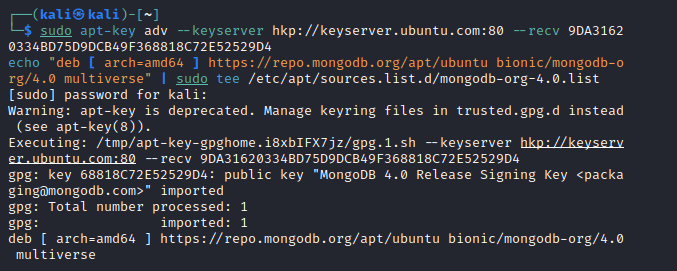
Step 2:- Update your package list and install Mongo-DB:
Code
sudo apt-get updatesudo apt-get install -y mongodb-orgOutput
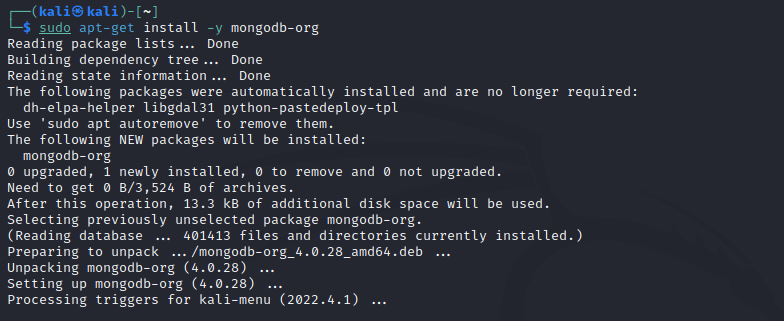
Step 3:- Start Mongo-DB service and verify that service is running
Code
sudo service mongod startsudo service mongod statusOutput
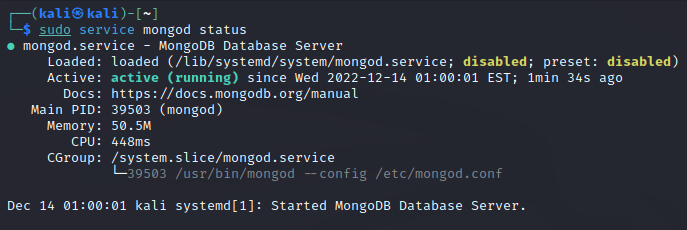
Step 4:- To connect to Mongo-DB, you can use the ‘mongo‘ command-line client:
code
mongoOutput
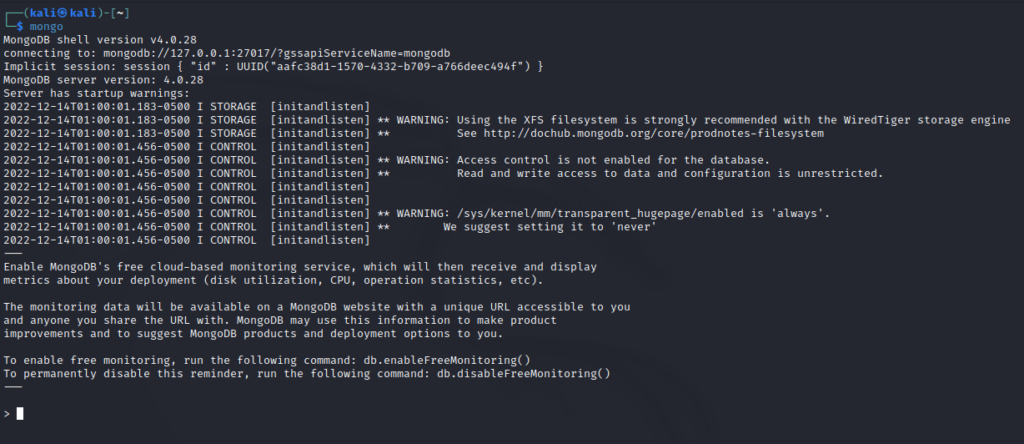
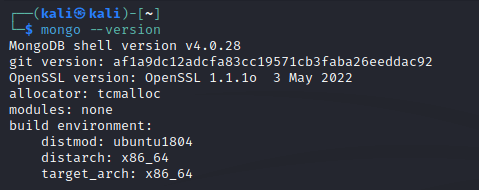
To check the version of Mongo-DB, you can use ‘mongo –version’ command:
Code
mongo --versionOutput
// 04 Installation of Mongo-DB on Windows
To install Mongo-DB on a Windows machine, you can follow these steps:
- Download the Mongo-DB installer from the official Mongo-DB website:
https://www.mongodb.com/download-center/community- Double-click the downloaded installer file and follow the instructions to install Mongo-DB on your system.
- After the installation is complete, you can start Mongo-DB by running the ‘
mongod‘ command from the command line.
mongod- To connect to MongoDB, you can use the ‘
mongo'command-line client:
mongoThis will open the Mongo-DB shell, where you can run MongoDB commands and interact with your database.
// 05 What are the advantages of using Mongo-DB?
- Flexible data model: – MongoDB allows you to store data in a flexible document-oriented format, which makes it easier to model complex relationships and hierarchies. This can help reduce the need for data normalization and allow for more rapid development and iteration.
- High scalability: – MongoDB is highly scalable, making it well-suited for applications that need to handle large amounts of data or a high volume of traffic. It offers a number of features, such as sharding and indexing, that can help improve performance and scalability.
- High performance: – MongoDB offers a number of performance-enhancing features, such as in-memory caching and indexing, that can help improve the speed and efficiency of database operations.
- Easy to use: – MongoDB has a simple and intuitive interface that makes it easy to learn and use. It also offers a rich ecosystem of tools and libraries that can help developers build and manage their applications more effectively.
- Cost-effective: – MongoDB is an open-source database, which means that it is available for free. This can help reduce the cost of software licensing and make it more accessible to a wider range of users.